
Quick Answer
What SEO checklist should a new website complete before applying for AdSense? Before you apply, your site should have original, useful content, the core trust pages (About, Contact, Privacy Policy, and Terms), clean navigation, a mobile-friendly layout, decent loading speed, and pages that are properly indexed in Google. The site should feel finished and genuinely useful, not half-built.
What pages are important before AdSense approval? At a minimum, About, Contact, Privacy Policy, and Terms. An editorial policy and an author bio add extra trust. These pages help Google and readers see that a real, accountable person runs the site.
Can a new website with only a few blog posts get approved? It can, but it is risky. Google does not publish a required number of posts, so there is no magic count. The real issue with a few posts is that the site often looks thin and unfinished, which is one of the most common reasons new sites are rejected. Quality and completeness matter more than a number.
That is the short version. Below is the full, practical checklist you can actually work through before you apply.
Introduction
Applying for AdSense too early is one of the most common mistakes new site owners make. The site looks fine to the owner, but to a reviewer, it looks thin, unfinished, or copied from a template. The fix is rarely complicated. It is mostly about completing the basics properly before you apply.
This guide walks through that preparation step by step. It covers content, the pages you need, technical setup, indexing, user experience, and trust. None of it promises approval, because no honest guide can. What it does is help you remove the obvious reasons a new site gets turned down, so you apply when the site is genuinely ready.
Why a New Website Should Not Apply Too Early
When you apply, a reviewer looks at whether your site offers real value and follows the policies. A brand new site that is missing pages, full of placeholder text, or carrying only a few short posts gives them very little to say yes to.
Applying early and getting rejected is not the end of the world, but it wastes time and can be discouraging. It is usually better to spend a couple more weeks finishing the site than to rush an application that was never likely to pass. Think of it like opening a shop. You would not unlock the doors while the shelves are still empty and the paint is wet.
How Much Content You Really Need
Here is the honest answer. Google does not publish a minimum number of posts, a minimum amount of traffic, or a required site age for AdSense. Anyone who gives you an exact guaranteed number is stating an opinion, not a Google rule.
So instead of chasing a count, aim for completeness. Every category or section you show in your menu should have enough useful posts so that it does not look empty. Your best work should be original and actually helpful. A small site with a handful of genuinely strong, complete articles and full trust pages is in a far better position than a site with twenty thin posts and empty pages.
A simple test helps. Open your own site as if you were a stranger. If a section feels empty or a page looks unfinished, it is not ready yet.
Content Quality Checklist
Content is the foundation, so this is where most rejections are won or lost. Work through these before you apply.
Every article is original and written for real readers, not copied or lightly reworded from other sites.
Posts actually answer the question or solve the problem they promise in the title.
Thin posts of a few short paragraphs are expanded into something genuinely useful, or removed.
You have not published large amounts of generic AI-written content with no real value added. Using AI to help is allowed, but the page must offer something useful and accurate, not filler.
Each post has a clear structure with headings and short paragraphs that are easy to read.
Any facts or figures you state are accurate, and where useful, you link to a credible source.
Spelling and grammar are clean, because sloppy writing signals low quality.
A quick note on AI content. The risk is not the tool; it is lazy output. Pages that are mass-produced, generic, and add nothing are the problem. If you use AI to draft, add your own experience, examples, and accuracy before you publish.
Important Pages Checklist
These pages tell Google and your readers that a real, accountable person stands behind the site. Missing pages are one of the most common reasons new sites are rejected.
About page that clearly explains what the site is, who runs it, and who it helps.
Contact page with a real way to reach you. Remove any fake or placeholder phone numbers or addresses that came with a template.
Privacy Policy that reflects how your site actually handles data, including advertising and cookies.
Terms page that sets out the basic rules for using your site.
Editorial policy that explains your standards for content. This is optional, but it adds trust.
Author bio linked to your posts, so readers can see who wrote them and why they can be trusted on the topic.
Fake contact details deserve a special mention. Many templates ship with a sample address, a sample phone number, and a sample email. Leaving those alive looks careless and untrustworthy. Replace them with real details before you apply.
Technical SEO Checklist
You do not need to be a developer to get the technical basics right. Focus on these.
The site loads at a reasonable speed on both desktop and mobile. Large unoptimised images are the most common cause of slow pages, so compress them.
The layout is mobile-friendly and easy to use on a phone, since most visitors arrive on mobile.
Navigation is clean and simple so that a visitor can find their way around without confusion. For the on page basics, our on-page SEO checklist covers headings, structure, and more
No broken links are pointing to pages that do not exist.
There is no leftover dummy text, lorem ipsum, or sample widgets from the template.
Your homepage does not repeat the same few posts in several sections to look full. Repeated padding looks low-quality.
You are not using copied images that you do not have the rights to use. Use your own images, properly licensed images, or free-to-use sources.
Your site uses HTTPS with a valid certificate.
Indexing Checklist
If Google cannot find and index your pages, they cannot be assessed properly. Beginners often skip this step.
Google Search Console is set up and verified for your site.
Your sitemap is submitted to Search Console.
Your important pages, including your key posts and trust pages, are actually indexed. Check this in Search Console rather than assuming.
You have reviewed pages that are set to noindex, and you understand why each one is. It is normal to noindex some pages, but you do not want your main content blocked by accident.
There are no obvious crawl errors or duplicate page problems left unresolved.
A stray noindex tag left on after launch is a classic mistake. If your content is not appearing in Google at all, check this first.
User Experience Checklist
A reviewer and a reader judge a site partly on how it feels to use.
The purpose of the site is clear within seconds of landing on the homepage.
The design is clean and not cluttered with distracting elements.
Menus and categories make sense and lead somewhere useful.
There are no empty categories or placeholder pages live on the site. If a category has no posts yet, either fill it or remove it from the menu for now.
The reading experience is comfortable, with readable font sizes and sensible spacing.
Internal links connect related posts so that readers can move from one useful page to the next.
Internal linking does a quiet but important job here. It helps Google discover your pages and helps readers stay and read more. On a new site, a common problem is the orphan page that has nothing linking to it. Connect your posts so none of them sit alone.
Trust and E E A T Checklist
Google describes quality partly through experience, expertise, authoritativeness, and trust, often shortened to E E A T. You cannot buy a trust score. Still, you can build the signals that make a site look credible.
Posts carry a real author name linked to a bio.
The About page makes the people and purpose behind the site clear.
Contact details are real and easy to find.
Claims are accurate, and sources are linked where they help.
The content shows real understanding of the topic, ideally with examples or first-hand experience.
The overall site looks like something a real, accountable person would be proud to publish.
Common Mistakes New Websites Make
These are the patterns that lead to rejection again and again.
• Applying with only four or five weak posts, so the site looks thin.
• Using a downloaded template without removing the demo content and sample pages.
• Publishing generic AI-written articles that add no real value.
• Leaving empty pages or empty categories live.
• Adding fake phone numbers or fake addresses from the template.
• Repeating the same content across the homepage to make it look full.
• Ignoring the mobile layout, so the site is awkward to use on a phone.
• Never checking which pages are actually indexed in Google.
• Having no clear site purpose, so a visitor cannot tell what the site is for.
• Writing for keywords instead of for users, so the content reads as stuffed and hollow.
Two Real World Examples
Example 1: New digital marketing blog
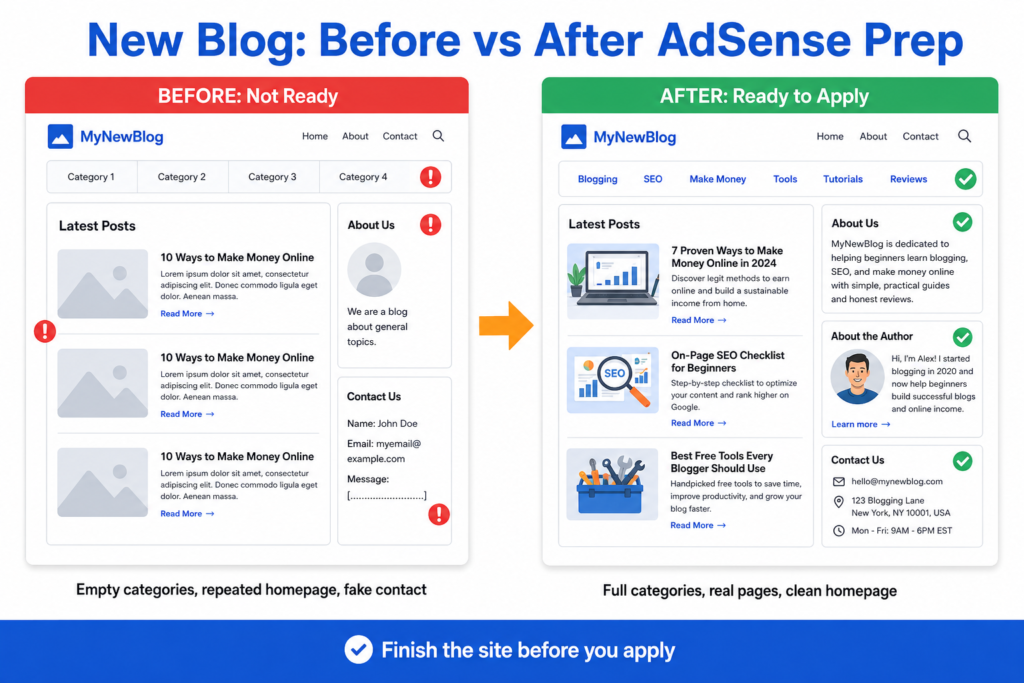
What the owner wants: They launched a marketing blog and want to start earning with AdSense soon after going live.
What is wrong with the site? There are only a handful of posts. Several categories appear in the menu, such as email marketing and analytics, but they are empty. The homepage repeats the same few posts in three different sections, so it looks padded rather than full. The About page is generic, there is no author bio, and the contact page still shows a sample address from the theme.
What should be fixed before applying: Remove or hide the empty categories until they have real posts. Rewrite the About page so it clearly explains the site and the person behind it, and add an author bio. Replace the sample contact details with real ones. Remove the repeated homepage sections. Make sure every category still in the menu has a few genuinely useful posts. Then check in Search Console that the key pages are indexed.
What the owner should publish next: A few more original, in-depth guides in the main categories, so each section feels complete, with one strong cornerstone post per category.
Image idea: A clean desk scene showing a website audit checklist on paper, a laptop open to Google Search Console, and a few blog post cards marked as complete.
Example 2: Template-based blog with 5 posts
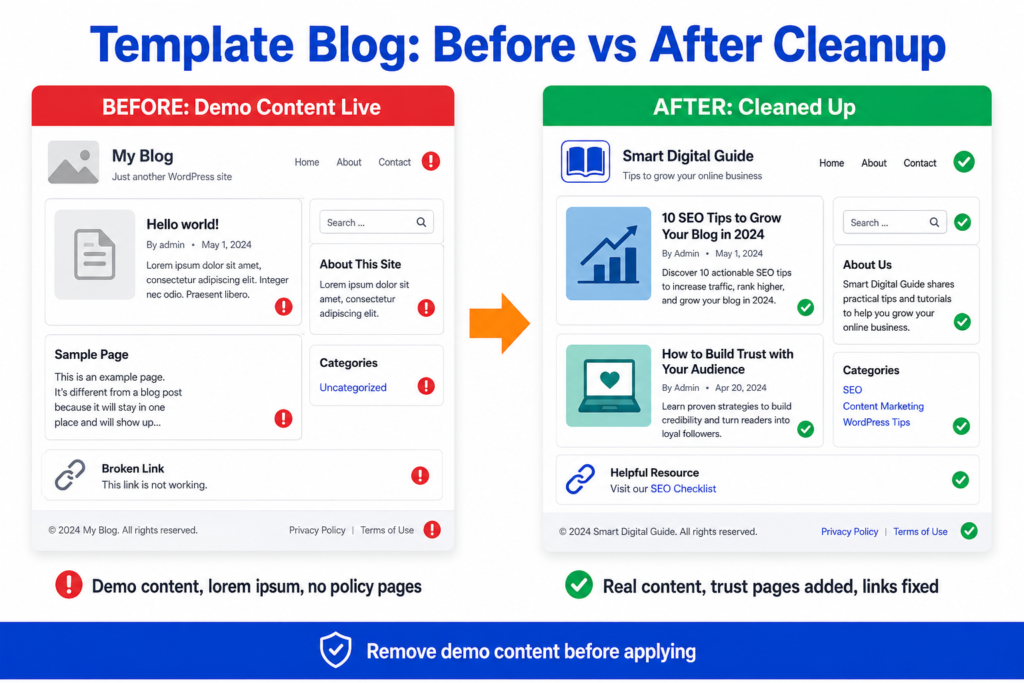
What the owner wants: They built the site from a downloaded theme, published five posts, applied for AdSense, and were rejected. They want to know why.
What is wrong with the site: The theme demo content is still live, including sample pages, a default first post, and placeholder lorem ipsum in some widgets. Several demo images came with the template, and the owner does not have the right to use them. A few demo links are broken. The five posts are short and thin. There is no Privacy Policy or Terms page, and the contact page shows the template maker’s sample details.
What should be fixed before applying: Delete all demo content and sample pages. Replace placeholder text with real content. Remove or replace any images you do not have the rights to. Add Privacy Policy, Terms, About, and Contact pages with real information. Expand the thin posts into useful articles, or replace them. Fix the broken links. Then recheck indexing in Search Console.
What the owner should publish next: Original, useful posts that match the site’s stated topic, and the complete set of trust pages, so the site looks finished and genuine.
Image idea: A before-and-after style image of a website layout, one side showing placeholder demo blocks and the other showing a clean, finished page with real content.
Practical Checklist Before Applying for AdSense
Run through this complete list. When you can tick every item honestly, the site is far more likely to be ready.
Homepage cleaned up, with no repeated padding sections.
About page written with real information.
Contact page with real, working contact details.
Privacy Policy published and accurate.
Terms page published.
Editorial policy added, if you choose to include one.
Author bio linked to your posts.
Articles are original and useful.
Each live category has enough useful content.
No empty pages live on the site.
No placeholder or lorem ipsum text anywhere.
No fake address or fake phone number.
No broken links.
Layout is mobile-friendly.
Pages load at a reasonable speed.
Google Search Console is set up and verified.
Sitemap submitted in Search Console.
Important pages confirmed as indexed.
Thin pages improved or removed.
Internal links added between related posts.
Navigation is clear and simple.
No copied images used without rights.
Frequently Asked Questions
Helpful Resources
Eligibility requirements for AdSense
Google AdSense Help.
The official page on who can apply, including the age requirement and the need to own your site. The most reliable place to confirm the basics.
AdSense Program policies
Google AdSense Help.
The rules your site must follow to serve ads. Reading these before you apply helps you avoid policy-related rejections.
Google Publisher Policies
Google The wider content policies that apply to publishers. Useful for understanding what content is allowed and what is restricted.
Google Search Central Google’s core guidance on how to build a site that works well in Search, including helpful content and technical basics. A strong foundation for the SEO side of your checklist.
Search Quality Rater Guidelines (PDF)
Google The document Google’s human raters use to judge quality, including experience, expertise, authoritativeness, and trust. It is the clearest description of what high quality looks like.
Google The help center for Google Search Console, where you set up your site, submit a sitemap, and check which pages are indexed.
Conclusion
There is no secret trick to AdSense approval, and no honest guide can promise it. What you can do is remove the obvious reasons a new site gets rejected. Finish your content, complete your trust pages, clean up anything left over from your template, fix the technical basics, and confirm your pages are indexed.
Work through the checklist above, then open your site as if you were a stranger seeing it for the first time. If every section feels complete and useful, and you can tick the list honestly, you are in a strong position to apply. Take the extra time to get it right, and you give yourself the best fair chance.