

Quick Answer
How do I optimise blog posts for Google AI Overviews? Write content that answers the question directly, structure it with question style headings, put the answer near the top of each section, show real experience, and make sure the page is crawlable and indexed. Google has said its AI features run on the same core search and quality systems as normal ranking, so there is no separate optimisation to do.
Is there special markup or a file needed to appear in AI Overviews? No. Google has confirmed there are no special tags, no separate requirements, and no file you need to add. Optimising for AI features is optimising for search.
Why is my page indexed but never appearing in AI answers? AI Overviews are grounded in Google’s index, so being indexed is only the entry requirement. If your page does not answer the question better than what is already being pulled, there is no reason for the system to use it.
Do AI Overviews appear for every search? No. Google shows them mainly for questions where a quick summary adds something useful, often for more complex or multi part questions.
If you run a new website, you have probably noticed something. Google now answers many questions directly at the top of the results with an AI Overview, and below it sits a list of links. The question on every site owner’s mind is simple. How do I get my blog into that answer?
Here is the honest version, and it is also the good news. There is no secret button and no special trick. Google has clearly said that AI Overviews and AI Mode run on the same core search and quality systems that already determine normal rankings. That means the work that earns you a place in an AI answer is mostly the same work that earns you a strong organic ranking. You write content that genuinely answers the question, makes it easy to read, shows you know the topic, and ensures Google can crawl and index the page.
This guide walks through how to do that, step by step, in plain language. No hype, no promises of overnight rankings, just the things that actually move the needle.
What Google AI Overviews Are
An AI Overview is a short, AI-written summary that can appear at the top of Google’s results for some searches. It pulls information from pages in Google’s index, stitches it into a quick answer, and shows links so people can click through to learn more.
A few things are worth understanding straight away. AI Overviews do not appear for every search. Google shows them mainly for questions where a quick summary adds something useful, often for more complex or multi-part questions. The overview is not a replacement for your page. It is a starting point that, when it works in your favour, sends interested readers to your site for the full answer.
Sitting alongside this is AI Mode, a more conversational search experience where people ask follow-up questions and dig deeper. Both features draw on the same Google index and quality systems, so you do not need to optimise for them separately.
Why AI Overviews Matter in 2026
They matter because they change where attention goes on the results page, not because they break the rules of SEO.
When an AI Overview answers part of the question, some people stop there. Others read the summary and then click a link to get the detail, a real example, or a step by step process the overview could not fully cover. For a new site, being one of those linked sources is valuable. It puts your name in front of readers who might never have scrolled far enough to find you in the old list of ten blue links.
Google has also said these features create openings for a wider range of sites to appear, including smaller and newer ones, because the system is looking for the most helpful piece of information on a topic, not just the biggest brand. That is encouraging if you are starting from zero. It does not guarantee anything, but it means a genuinely useful post has a fair chance.
How AI Overviews Choose Content to Show
You cannot see inside Google’s systems, and anyone who claims to know the exact formula is guessing. What Google has shared publicly, though, gives you enough to work with.
First, AI Overviews are grounded in Google’s search index. The system uses a method often described as retrieval-augmented generation, sometimes called grounding, which means it pulls real information from indexed pages to build the answer rather than inventing it. If your page is not crawled and indexed, it simply cannot be used. This is the most common reason a new site never appears, and it comes up again later in this guide.
Second, Google uses a technique called query fan out. Instead of treating your search as one question, the system can fire off several related searches across subtopics and sources, then assemble an answer from the best of them. The practical lesson here is big. A post that covers a topic properly, including the related questions a reader would naturally ask next, has more surfaces that can be matched. A thin post that answers only the exact title has fewer.
Third, the same quality signals that have always mattered still apply. Google’s own guidance is direct about this. Optimising for its AI features is optimising for search, and that is still SEO. There are no separate requirements, no special tags, and no magic file you need to add.
Start With Search Intent, Not Just the Keyword
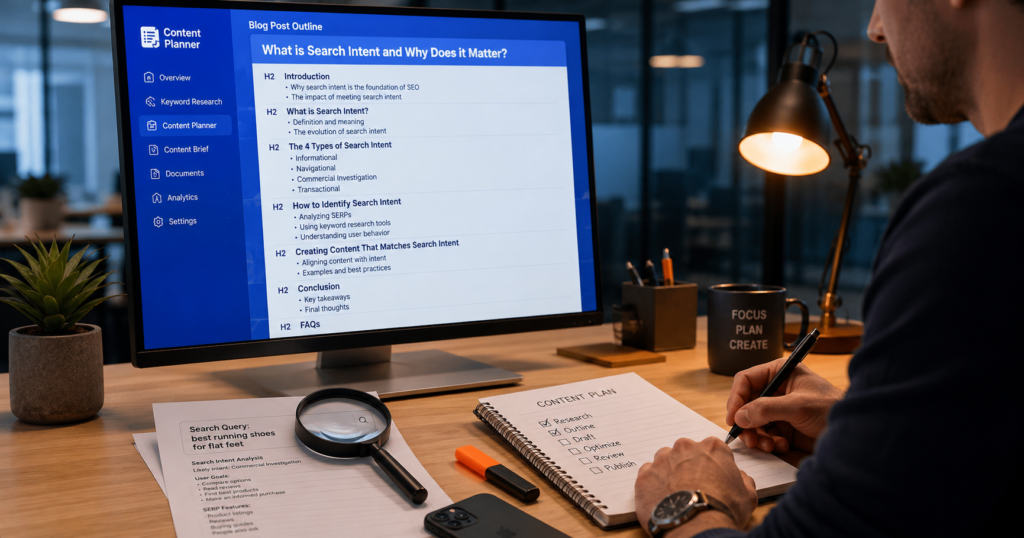
This is where most new site owners go wrong, and it is worth slowing down on.
A keyword is a string of words. Intent is what the person actually wants when they type it. If you write for the keyword and ignore the intent, you can have the phrase in your title and still not answer the question, which means you will not rank well, and you certainly will not be pulled into an AI answer.
Here is a common scenario. Someone targets the phrase “Google Ads conversion tracking” and writes a long page defining what conversion tracking is. But most people searching that phrase already know what it is. They want to set it up, or they want to fix it because it stopped recording. the searcher came to do. The fix is not more keywords. The fix is to look at what already ranks for that query, read the top results, and notice the format Google is rewarding. If the page one results are step-by-step setups and troubleshooting guides, that is the intent. Match it. Both of those are separate posts on this site for exactly that reason, one on setting up conversion tracking and one on why an account shows active but records nothing. The page reads fine, yet it misses the job
Before you write a single heading, search your target query yourself and ask one question. What does this person need to walk away with? Build the post around that answer.
How to Structure a Blog Post for AI Answers
Structure helps both readers and machines find the answer fast. You do not need anything fancy. You need clarity.
Use headings that match real questions
Write your H2 and H3 headings the way people actually ask things. “How do I fix it?” beats “Resolution methodology.” Plain question-style headings make it obvious what each section covers, which helps Google understand the page and helps the reader scan it in seconds.
Put the answer near the top of each section
Lead with the answer, then explain. If a section asks “how long does indexing take,” the first sentence should give the honest answer, and the rest can add the details and the exceptions. Burying the answer three paragraphs down helps no one.
Cover the next question
Because of the query fan out, the related questions matter. If your post is about ranking in AI Overviews, a reader will naturally wonder about indexing, internal links, and author trust. Covering those inside the same post, in clearly labelled sections, makes the page far more complete and useful.
Write Direct Answers People Can Lift
A direct answer is a short, clear, self-contained response to a specific question, usually two to four sentences, written in plain language.
This habit helps you in two ways. It is good for readers, who get clarity immediately. It is also the kind of clean, quotable passage an AI answer can summarise without confusion. Notice that this is not a trick. You are not writing for the machine at the expense of the human. You are writing clearly, which serves both.
A simple pattern works well. State the answer in one or two sentences. Add a sentence of useful context or a caveat. Then move into the deeper explanation for readers who want more. Avoid padding the answer with throat clearing background the reader did not ask for.

Show Real Experience and Examples
This is the part that separates a forgettable post from one people trust, and it is also where the extra E in Google’s quality framework comes in. Google now looks for experience, expertise, authoritativeness, and trust, often shortened to E-E-A-T. Experience was added because first-hand knowledge is hard to fake and genuinely useful.
So show your work. If you are writing about a Google Ads problem, describe what the dashboard actually looks like when it happens, the settings people miss, and the order you would check things in. If you are writing about indexing, mention the real situations that cause it, like a page blocked in robots.txt, a stray noindex tag left on after launch, or a brand new domain that simply has not been crawled yet.
Google’s quality guidelines make a related point that matters in 2026. Using AI tools to help you write is allowed, but the content has to add real value. The guidelines specifically describe low-effort, mass-produced pages as a problem. So the lived detail, the example, and the honest caveat are not decoration. They are the value.
Add Author Credibility and Trust
Trust is a signal you build, not one you claim. A few practical steps go a long way, especially for a new site.
Add a real author byline to your posts and link it to a proper bio that says who you are and why you can write about this. Build a clear About page that explains what the site is for and who runs it. Make your contact details easy to find. When you state a fact or a statistic, link to the credible source it came from rather than asserting it out of thin air.
None of this is about gaming a score. There is no single trust number you can look up or buy. These steps simply make it obvious to a reader, and to Google’s systems, that a real and accountable person stands behind the content.
Use Internal Links the Right Way
Internal links do two quiet but important jobs. They help Google discover and understand your pages, and they guide readers to the next useful thing.
On a new site, a common problem is the orphan page, a post that no other page links to. If nothing points to it, it is harder to discover and easy to overlook. When you publish a guide on AI Overviews, link it from your related posts on SEO basics, indexing, and content quality, and link out from it to those too.
Use descriptive anchor text that tells the reader what they will get, like “our guide to fixing indexing problems,” rather than “click here.” Keep it natural. A handful of relevant internal links inside a post is plenty. Stuffing twenty links into a paragraph helps no one and looks spammy. For the full technical picture, our on page SEO checklist covers structure, headings, and linking in more depth.
Use FAQs That Match Real Searches
A short FAQ section at the end of a post is a clean way to cover the smaller questions that did not fit the main flow. Because these are often phrased exactly as people search, they map well to the related questions a query fan-out might explore.
Pick real questions, not invented ones. Use the “People also ask” box on Google, the autocomplete suggestions, and the questions readers actually email you. Answer each one briefly and honestly. If you want, you can add FAQ structured data so the questions and answers are clearly labelled, though remember that markup only marks up content that is genuinely on the page. Do not mark up answers that are not visible to readers.
Update Old Content So It Stays Useful
Content is not finished when you publish it. Search results change, tools change their interfaces, and advice that was right last year can quietly go stale. The systems doing the ranking change too, and adapting your site after a Google update is the same discipline applied on a bigger scale.
A simple content audit habit helps. Every few months, look at your older posts and ask whether the steps still match reality. Update the screenshots if the dashboard changed, correct anything that is no longer true, and refresh the year in the title only if the content behind it is actually updated. Changing 2025 to 2026 in the title while leaving outdated steps underneath is a content audit mistake, not an update, and readers notice.
Updating a strong post is often a better use of an hour than publishing a weak new one. Which posts deserve that hour is worth deciding deliberately, and knowing which of your topics are genuinely evergreen tells you where the return is.
How to Avoid Thin Content
Thin content is a page that does not give the reader enough to satisfy the search. It is one of the biggest reasons new sites stall.
Picture a new blog that publishes twenty short posts in its first week, each three hundred words, each lightly rewritten from another site. None of them ranks. The owner assumes Google is ignoring new sites, but the real issue is that no single page is the best, or even a useful, answer to anything. Google’s guidelines describe mass-produced, low-value pages as exactly the kind of thing its systems work against.
The fix is not more posts. It is fewer, better ones. One thorough, genuinely helpful guide will do more for you than ten thin ones. Depth here does not mean padding to hit a word count. It means actually answering the question and the obvious follow-ups. Our content calendar generator can help you plan fewer, stronger posts instead of a flood of thin ones.
Make Content Useful for Both Google and AI Tools
You may wonder if you need a different strategy for AI tools like ChatGPT, Copilot, or Perplexity. For Google’s own AI features, the answer from Google is that it is the same work, because those features sit on top of normal search.
Other AI platforms may weigh things a little differently, and some pull from sources outside Google. But the foundations that help you in all of them overlap heavily. Clear, well-structured, factually accurate content from a trustworthy source, on a page that machines can crawl and read, is the common thread. You do not need to write in a robotic, keyword-stuffed style for the machines. Google has said its systems understand synonyms and natural meaning, so there is no need to repeat every variation of a phrase. Write for the person, keep it clear, and the machines follow.
Common Mistakes to Avoid
- Writing for the keyword while ignoring what the searcher actually wants.
- Publishing lots of thin posts instead of a few strong ones.
- Leaving a page blocked from crawling or indexing, then wondering why it never appears.
- Copying or lightly rewriting other people’s content with nothing original added.
- Skipping the author bio, About page, and contact details, so the site looks anonymous.
- Stuffing keywords or links in the hope of tricking the system.
- Changing the year in a title without updating the content beneath it.
- Chasing fake mentions or special files that Google has said do not help.
Quick Checklist
Run through this before you publish:
- I searched the query myself and understand the real intent.
- The post answers the main question clearly and near the top.
- Headings are written like real questions.
- Each section leads with a direct, quotable answer.
- I included at least one real example or first-hand detail.
- There is a real author byline linked to a proper bio.
- The page links to and from related posts on my site.
- I covered the obvious next questions, including a short FAQ.
- The page is not blocked by robots.txt or a stray noindex tag.
- Facts are accurate and linked to credible sources.
- The content is genuinely useful, not padded to hit a word count.
Frequently Asked Questions
Conclusion
Ranking in Google AI Overviews is not about outsmarting Google. It is about doing honest work well. Understand what the searcher really wants, answer it clearly and early, prove you know the topic with real detail, make the page trustworthy, and make sure Google can actually read it.
If you are starting a new site, that is genuinely good news. It means you are not locked out by a secret system. A clear, useful, well-structured post written by a real person has a fair chance of being the source an AI answer points to. Our SEO checklist for a new website covers the foundations worth having in place before you worry about AI answers at all. Build that habit one post at a time, keep your older content fresh, and let the results compound.
Strong Resources
Optimising Your Website for Generative AI Features
Source: Google Search Central. Google’s official, on record guide for AI features like AI Overviews and AI Mode. The single most reliable place to confirm what works.
AI Features and Your Website
Source: Google Search Central. A clear explanation of how AI Overviews and AI Mode work from a site owner’s point of view, including how content is selected.
Creating Helpful, Reliable, People First Content
Source: Google Search Central. Google’s self assessment guide for content quality, covering experience, expertise, authoritativeness, and trust.
Search Quality Rater Guidelines (PDF)
Source: Google. The full document Google’s human raters use to judge quality, including its position on AI generated content.
Google Search Central Blog
Source: Google Search Central. Where Google announces search updates, including changes to AI features and quality guidance.