
Quick Answer
If your website is indexed but not ranking on Google, it means Google has discovered and stored your page in its database, but does not believe it deserves to appear when someone searches for your target query. Indexing is just Google saying, “this page exists.” Ranking is Google saying, “This page is the best answer.” The gap between the two usually comes down to weak content, poor search intent match, missing internal links, low topical authority, or technical SEO issues that need fixing.
This guide breaks down exactly why this happens and what to do about it.
What Does Website Indexed But Not Ranking Mean?
When a page is indexed, it means Googlebot has crawled it, processed it, and added it to Google’s index. You can confirm this by typing site:yourdomain.com/page-url into Google search.
But indexing is only the first checkpoint. After indexing, Google evaluates your page against thousands of other pages competing for the same query. Just because your page is indexed does not mean Google will show it. Google only ranks pages that it believes are useful, relevant, and trustworthy.
So your page is in the library, but no one is being directed to read it.
Indexed vs Ranking: What Is the Difference?
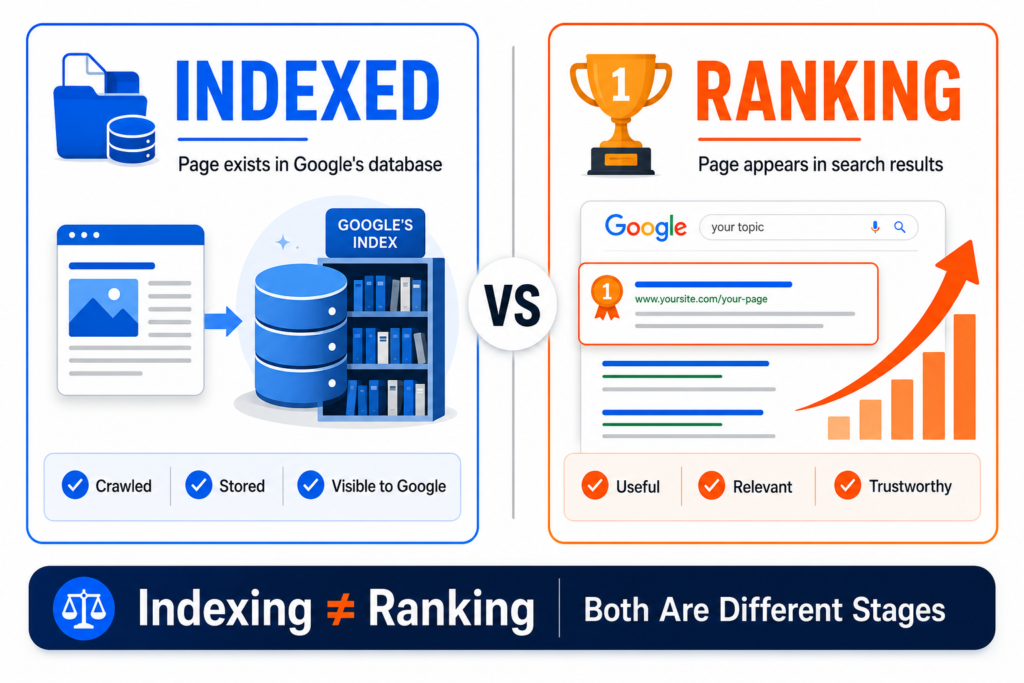
These two words are often confused, even by experienced marketers.
| Stage | What It Means | What Google Is Doing |
| Crawled | Googlebot has visited the page | Reading the page content |
| Indexed | The page is stored in Google’s database | Storing for future retrieval |
| Ranked | The page appears in search results | Showing it to real users |
Think of it like applying for a job. Indexing is having your CV on file. Ranking is being called for the interview. Most pages sit in the database forever and never get the call because they do not stand out.
Why Your Website Is Indexed But Not Ranking on Google
Here are the most common real-world reasons your page is indexed but not ranking.
Your Page Does Not Match Search Intent
This is the number one reason indexed pages fail to rank.
If someone searches “best running shoes,” they want a comparison list. If your page is a single-product page selling a single shoe, you are answering a different question. Google will not rank a product page for a comparison query, even if both are about running shoes.
Match the format Google is already ranking. If the top 10 results are listicles, you need a listicle. If they are how-to guides, you need a how-to guide.
Your Content Is Too Thin or Generic
Pages that rank well for competitive terms tend to provide genuine depth that a reader could not find in five seconds elsewhere.
But word count is not the goal. Depth is. A 2,000-word page that answers every question a reader has will outrank a 3,000-word page stuffed with repetition.
If your content reads like a summary of what already ranks, Google has no reason to choose you over the original.
Your Website Has Weak Topical Authority
Google does not just rank individual pages anymore. It evaluates your entire site’s expertise on a topic.
If you publish one page about PPC and ten pages about unrelated topics, Google will not see you as a PPC expert. The site with twenty deep articles on PPC will outrank you every time, even if your single article is technically better written.
Your Page Has Poor Internal Linking
A page with zero internal links pointing to it sends a clear signal to Google: even the website’s owner does not think this page matters.
Internal links pass authority and tell Google which pages are most important. If your indexed page is orphaned, it has no signals of importance.
Your Keyword Is Too Competitive
A new website trying to rank for “SEO” is competing against Moz, Ahrefs, Semrush, and Search Engine Journal. These sites have decades of authority and thousands of backlinks. No amount of on-page optimisation will overcome that gap quickly.
Lower competition long-tail keywords are where new sites win first. That gap is why smaller sites sometimes question the channel entirely, and whether SEO still works for a small business is worth reading before you give up on a term.
Your Title Tag and Meta Description Are Weak
Even if Google ranks you, a weak title gets no clicks. A low click-through rate signals to Google that users do not find your result valuable, which can push rankings down further.
Generic titles like “SEO Tips” will lose to specific ones like “On-Page SEO Checklist 2026: 15 Steps to Rank Higher.”
Your Page Has Duplicate or Similar Content
If you have multiple pages targeting the same keyword, Google does not know which one to rank. This is called keyword cannibalisation. Often, Google ranks none of them well or picks the wrong one.
Duplicate content from other sites is even worse. Google has no reason to rank a copy when the original already exists.
Your Page Has Technical SEO Issues
Technical problems can hold an indexed page back even when the content is fine. A canonical tag pointing somewhere else tells Google to rank a different URL instead of yours. Slow Core Web Vitals and mobile usability problems weaken the page experience signals. Broken internal links leave dead ends that waste the authority you are trying to pass. None of these stop a page from being indexed, which is exactly why they are easy to miss on a page that Google has already accepted.
Other common technical issues:
- A canonical tag pointing to a different URL.
- Slow Core Web Vitals scores.
- Mobile usability problems.
- Broken internal links.
Your Website Is New and Has Low Trust
New domains go through what some SEOs call a “sandbox” period. Even if your content is excellent, Google waits to see signals of legitimacy: consistent publishing, backlinks, user engagement, and time. Earned links are one of those signals, and guest posting on real sites is one of the few ways a new site can build them without buying anything.
Our SEO checklist for a new website covers what to get right in that early period, when the foundations matter more than the rankings. Most new sites need 3 to 6 months before competitive keywords start moving.
Most new sites need 3 to 6 months before competitive keywords start moving.
Your Page Is Indexed But Has No Strong Reason to Rank
Sometimes a page is technically fine, but it does not stand out. It does not have original insights, unique data, expert commentary, or anything Google cannot already find elsewhere.
Google’s Helpful Content system is specifically designed to identify and downgrade content that feels generated for algorithms rather than written for people. Google also keeps changing how it evaluates helpfulness, so what worked a year ago may not work today. Our guide on how to adapt your website after Google updates covers what changes to watch for.
If your page does not give users something they cannot get from the top 10 results already ranking, Google has no incentive to replace them with you.
How to Check Why an Indexed Page Is Not Ranking
Google Search Console (GSC) is your diagnostic tool. Here is exactly what to check.
Step 1: Confirm the page is indexed
Use the URL Inspection Tool inside GSC. Paste the full URL. It will tell you:
- Indexing status (indexed or not)
- The canonical URL Google has chosen
- When it was last crawled
- Any indexing or coverage issues
Step 2: Check the Performance Report
Go to Performance → Search Results. Filter by the specific page URL.
Look for:
- Impressions. Is Google showing the page at all?
- Clicks. Are users clicking when they see it?
- Average position. Where is it ranking?
- Search queries. Which keywords is it appearing for?
If impressions are zero, the page is ranking too low to show up in results (usually beyond position 100).
If impressions exist but clicks are very low, the title tag and meta description need work. It can also mean an AI Overview is answering the query above your result, and optimising your posts for AI Overviews is a different fix from rewriting a title.
Step 3: Check the Page Indexing Report
Sometimes Google indexes a page but flags issues:
- Soft 404
- Indexed but blocked by robots.txt
- Page with redirect
- Duplicate without a user-selected canonical.
These all weaken ranking potential.
Step 4: Check Sitemap Status
Make sure your sitemap is submitted, and the page is included. Pages not in the sitemap are still crawlable, but submitting helps Google prioritise.
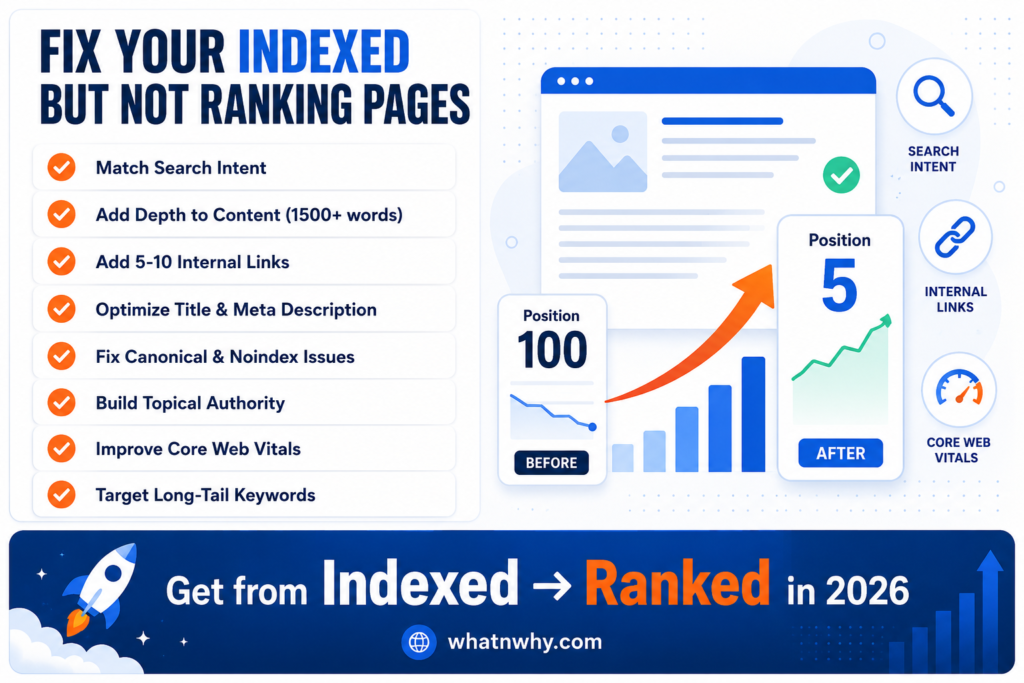
How to Fix a Website That Is Indexed But Not Ranking
Now the practical fixes.
Improve the Search Intent Match
Google your target keyword. Look at the top 10 results. Ask:
- Are they blogs or product pages?
- Are they listicles, how-to guides, or definitions?
- What questions do they answer?
Rebuild your page to match. If everyone’s ranking is a step-by-step guide, do not publish a 500-word opinion piece.
Rewrite the Content With More Depth
Cover the topic completely, then stop. The goal is that a reader finishes the page with no unanswered questions, not that they finish a word count.
Add:
- Step-by-step instructions
- Real screenshots or examples
- Frequently asked questions
- Common mistakes to avoid
- A clear conclusion with next steps
Add Real Examples and Practical Steps
Generic advice ranks nowhere in 2026. Specific advice with real numbers, real examples, and real screenshots ranks everywhere.
If you are explaining a strategy, show what it looked like when you used it. If you are reviewing a tool, show the actual dashboard. Specificity is what separates ranking content from indexed-and-forgotten content.
Improve Internal Linking
Find 5 to 10 older posts on your site that are relevant to the page that is not ranking. Add a natural contextual link from each of those posts to the underperforming page.
Use descriptive anchor text. Not “click here.” Something like “our complete on-page SEO checklist” tells Google what the linked page is about.
Optimise the Title Tag and Meta Description
Rewrite the title to be specific, benefit-driven, and under 60 characters. Add the year if relevant.
Rewrite the meta description to clearly answer “why should I click this?” Include the primary keyword naturally and end with a soft call to action. Before publishing your rewrite, check how it looks with our meta title and description preview tool.
Fix Canonical, Noindex, and Robots.txt Issues
Check the page source for:
- <meta name=”robots” content=”noindex”>. Remove if accidental
- <link rel=”canonical” href=”…”>. Make sure it points to itself, not a different page.
- Robots.txt rules are blocking the URL.
A single accidental noindex tag can keep a perfect page invisible forever.
Build Topical Authority Around the Topic
If your underperforming page is about “Google Ads bidding strategies,” write 5 to 8 supporting articles around it:
- Manual vs automated bidding
- Target CPA explained
- Maximize conversions bidding strategy
- When to use Enhanced CPC
Link them all back to the main page. This creates a content cluster, which signals topical depth.
That is not a hypothetical list. Our guide on automating PPC bidding covers exactly those subtopics, which is what a real cluster looks like once it is built.
Planning that cluster ahead of time is easier with our content calendar generator.
Improve Page Experience and Core Web Vitals
Run your page through PageSpeed Insights. Focus on:
- LCP under 2.5 seconds
- CLS under 0.1
- INP under 200ms
Fix slow images (compress, use WebP), eliminate render-blocking scripts, and check mobile usability.
Target Lower Competition Keywords First
If your page is targeting a head term like “PPC management,” it may never rank. Pivot to long-tail variations:
- “PPC management for small businesses UK”
- “How much does PPC management cost in the USA?”
- “PPC management vs in-house: which is better?”
Rank for the easier terms first, build authority, then go after the bigger keywords.
How This Usually Plays Out
A small accounting firm in the UK publishes a blog post titled “Tax Tips.” Google indexes it within a few days. Three months later, impressions are still zero.
Here is what is actually happening:
The keyword “tax tips” is dominated by HMRC, MoneySavingExpert, and major news outlets. A new accounting firm cannot outrank them.
The content is 600 words of generic advice anyone could write in 30 minutes. There is no unique insight, no real-world client example, no specific guidance.
The page has zero internal links pointing to it. It is orphaned. Google has no signal that this page matters to the website owner.
The title tag is exactly “Tax Tips” with no specificity. Even if it ranked, no one would click.
The fix:
- Rewrite the post to target “self-employed tax tips UK 2026.”
- Expand to 2,000 words covering common deductions, deadlines, and real examples.
- Add internal links from 5 other relevant posts on the site.
- Update the title to “Self-Employed Tax Tips for UK Freelancers (2026 Guide).”
- Add the accountant’s credentials and bio for trust signals.
Once the page targets a query it can realistically compete for and has internal links pointing at it, impressions usually start appearing before rankings do. That first signal is what tells you the direction is right.
Indexed But Not Ranking Checklist
Run through this list for any page that is indexed but not ranking:
- The page matches the dominant search intent for the target query.
- Content is at least as deep as the top 10 ranking pages.
- The primary keyword appears in the title, first paragraph, and at least one H2.
- The title tag is under 60 characters, specific, and compelling.
- Meta description is under 155 characters and includes a CTA.
- The URL slug is short, keyword-rich, and uses hyphens.
- At least 5 internal links from relevant posts point to this page.
- No accidental noindex tag is present.
- Canonical tag points to the page itself.
- Robots.txt does not block this page.
- Core Web Vitals scores are within Google’s thresholds.
- Mobile usability passes Google’s check.
- Author bio with credentials is visible (E-E-A-T).
- Original insights, examples, or data are included.
- The FAQ section with schema markup is added.
- At least 3 supporting articles link to this page from within the site.
Frequently Asked Questions
Final Thoughts
Getting indexed is easy. Ranking is hard.
Indexing is just Google’s way of saying “we know this page exists.” Ranking is Google’s way of saying “this page deserves to be seen.” The difference between the two comes down to whether your page genuinely answers a query better than what is already ranking.
In 2026, the bar is higher than ever. Thin content, generic advice, and keyword-stuffed pages do not rank. What ranks is content that combines clear search intent, genuine depth, real expertise, strong internal linking, and clean technical SEO.
If your website is indexed but not ranking, do not request indexing again. Improve the page itself. That is the only thing that actually moves rankings.