
Quick Answer
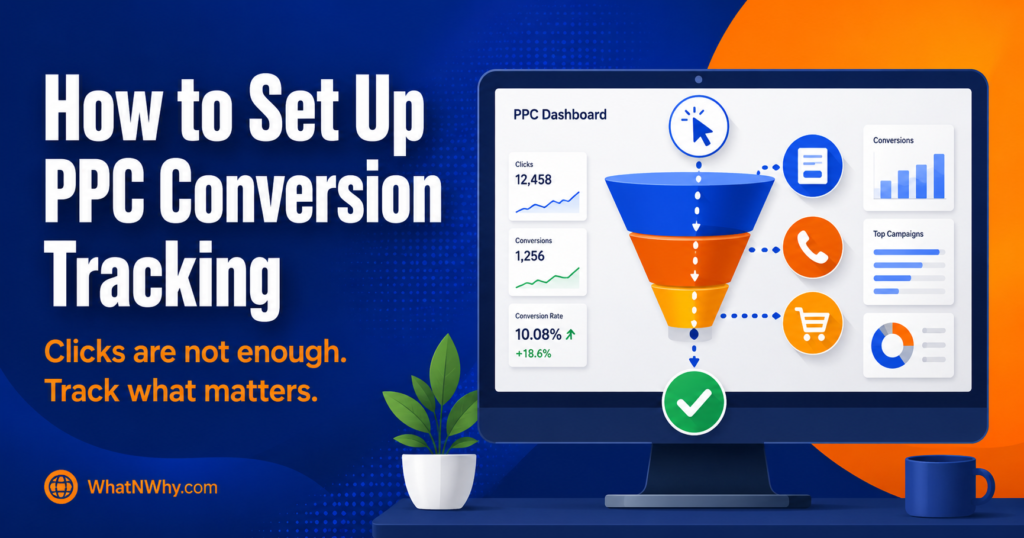
What is PPC conversion tracking? It is the process of recording what happens after someone clicks your ad. Instead of counting clicks alone, tracking shows you which clicks lead to real actions like form submissions, phone calls, purchases, or bookings.
How do you set up PPC conversion tracking with analytics tools? Define your main conversion goal first. Then install the right tools, typically Google Analytics 4 and Google Tag Manager. Connect your ad platform (Google Ads, Meta, or Microsoft Advertising) to your analytics. Create conversion events for the actions that matter. Test everything before you spend serious money.
Which tools are commonly used? Google Analytics 4, Google Tag Manager, Google Ads conversion tracking, Meta Pixel, Microsoft Advertising UET, and call tracking tools. Most setups use several of these together.
What conversions should a business track? The actions that matter to your business. For a service business, that is usually form submissions and phone calls. For ecommerce, purchases and add to cart events. For B2B, demo requests or qualified leads.
How do you know if tracking is working? Test every conversion before launch. Submit your own forms, make test calls, and check real-time reports in GA4. Use Google Tag Manager preview mode to confirm tags fire correctly. Then compare your analytics data with your actual form records or CRM.
Introduction
Running paid ads without conversion tracking is like paying for advertising and closing your eyes before the results come in. You know you spent money. You know people clicked. But you have no idea whether those clicks turned into anything useful.
This guide gives you a practical, beginner-friendly process for setting up PPC conversion tracking using the analytics tools most businesses need. It covers what to track, which tools do what, how to set them up safely, how to test, and the mistakes that waste the most money. No fake numbers, no overly specific interface screenshots that go stale, and no promise that tracking alone will fix your campaigns. What it will do is give you the data to make real decisions.
What Is PPC Conversion Tracking?
PPC conversion tracking connects what someone does on your website to the ad that brought them there. When a visitor clicks your ad and then submits a form, calls your number, makes a purchase, or completes any action that matters to your business, conversion tracking records that action and ties it back to the specific ad, keyword, and campaign that drove it.
Without tracking, all you see is clicks. Clicks tell you people arrived, but not whether they did anything useful after arriving. A campaign can look busy with clicks and still produce nothing. Tracking is what turns raw click data into business insight.
Why PPC Conversion Tracking Matters
Tracking matters because it is the only way to know whether your ad spend is producing real results.
It lets you see which campaigns, keywords, and ads actually drive conversions, so you can put more budget behind what works and stop wasting money on what does not. It feeds the data that ad platforms need to optimise delivery. Google Ads, for example, uses conversion data to power its automated bidding strategies. Without conversion signals, the system has nothing to optimise toward.
Tracking also lets you judge quality, not just volume. A cheap click that never converts is not a win. And a campaign with fewer clicks but more real leads or purchases is often the better investment. You cannot see any of this without tracking.
One honest caveat: tracking will not fix a bad campaign. It gives you data, and data helps you make better decisions. But the decisions, the offer, the landing page, the creative, and the audience still have to be right.
What Counts as a PPC Conversion?
A conversion is whatever action matters most to your business. It is not the same for everyone.
For a local service business, conversions are usually form submissions asking for a quote and phone calls from the ad or the landing page.
For an ecommerce store, conversions are purchases, and sometimes add to cart or initiate checkout events as secondary signals.
For a B2B company, conversions are demo requests, consultation bookings, or qualified lead form submissions.
For a consultant, conversions might be booking form submissions or email signups.
You can also track smaller actions, sometimes called micro conversions, that show interest but are not the final goal. Button clicks, scroll depth, video views, and file downloads can all be useful secondary signals. The key is to separate your primary conversion (the action that really matters) from the secondary ones, so your reporting stays clear, and your bidding optimises toward the right goal.
Best Analytics Tools for PPC Conversion Tracking
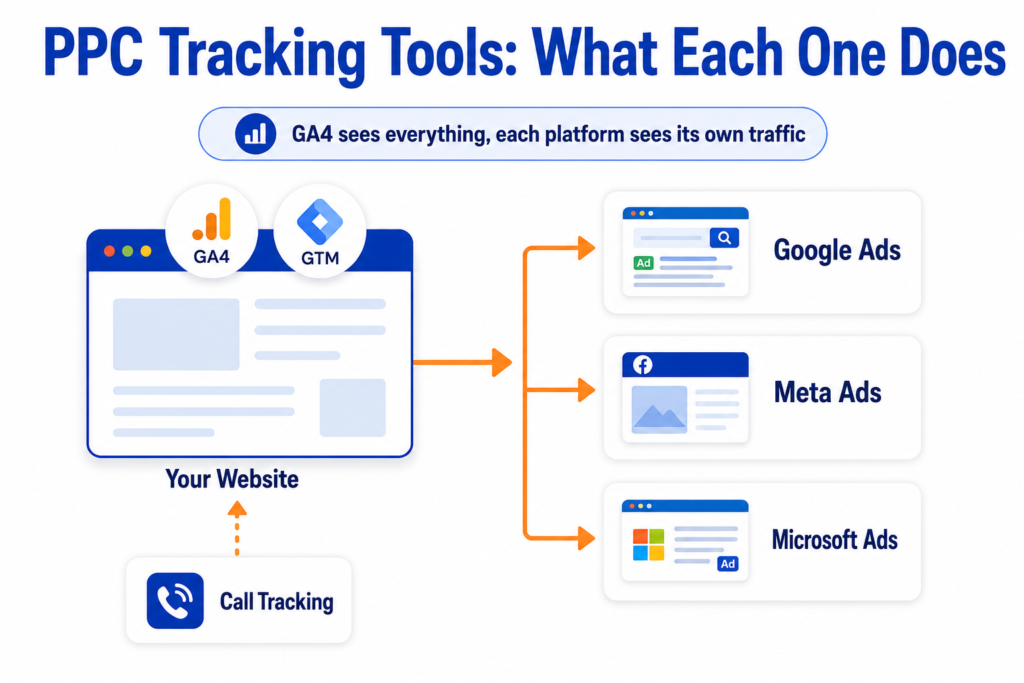
Several tools work together to make tracking work. Here is what each one does, when to use it, what it should not be used for alone, and a simple example.
Google Analytics 4 (GA4)
What it does: GA4 tracks what users do on your website after they arrive, using an event-based model. It shows you the full picture of user behaviour across your site.
When to use it: When you want to understand the journey from click to conversion, compare traffic sources, and analyse behaviour on your site.
What it should not be used for alone: GA4 is not an ad platform. It tracks and reports, but it does not optimise your ads directly. You still need to send conversion data back to your ad platform for bidding.
Example: A service business uses GA4 to see that visitors from Google Ads spend more time on the pricing page and submit forms at a higher rate than visitors from organic search.
Google Tag Manager (GTM)
What it does: GTM lets you add and manage tracking tags on your website without editing the site code every time. Tags, triggers, and variables are configured in GTM, which then fires the right code at the right moment.
When to use it: When you need to track events like form submissions, button clicks, or page views, and you want to manage all your tracking tags in one place.
What it should not be used for alone: GTM is a container, not an analytics tool. It deploys your tags, but the data goes to GA4, Google Ads, or another platform for reporting.
Example: A business uses GTM to fire a conversion tag when a visitor reaches the thank-you page after submitting a quote request form.
Google Ads Conversion Tracking
What it does: Records conversions directly inside Google Ads, tied to specific campaigns, ad groups, keywords, and ads. It powers reporting and feeds automated bidding.
When to use it: When you run Google Ads and want to measure results and let the system optimise toward your conversion goal.
What it should not be used for alone: Google Ads tracking only sees its own traffic. For a cross-channel view, you also need GA4.
Example: A local business creates a conversion action in Google Ads for phone calls, so it can see which keywords drive the most calls.
Meta Pixel
What it does: Tracks actions on your website from people who clicked or viewed a Meta (Facebook or Instagram) ad. It sends conversion data back to Meta for reporting and ad optimisation.
When to use it: When you run Meta ads and want to track and optimise toward specific website actions.
What it should not be used for alone: The pixel only sees Meta traffic. For a full picture, pair it with GA4. In 2026 the Pixel alone also misses conversions because of browser privacy changes, which is why the Conversions API is now part of a standard Meta setup.
Example: An ecommerce store installs the Meta Pixel to track purchases and uses that data to optimise its ad delivery toward buyers.
Microsoft Advertising UET
What it does: The Universal Event Tracking tag works like Meta Pixel but for Microsoft Advertising (Bing Ads). It tracks website actions from Microsoft ad clicks.
When to use it: When you run Microsoft Advertising campaigns.
What it should not be used for alone: Same as above. It only sees its own traffic.
Example: A B2B company running Bing ads uses UET to track demo request form submissions.
Call Tracking Tools
What it does: Assigns unique phone numbers to different campaigns or sources, so you can track which ad, keyword, or channel generated each phone call.
When to use it: When phone calls are a meaningful conversion for your business, which is common for local services, healthcare, legal, and home trades.
What it should not be used for alone: Call tracking shows call volume and source, but it does not show what happened on the call. For lead quality, you still need to review the actual calls or connect tracking to a CRM.
Example: A local plumber uses a call tracking tool to see that Google Ads drives twice as many calls as organic search, and uses that data to justify the ad budget.
How to Set Up PPC Conversion Tracking With Analytics Tools
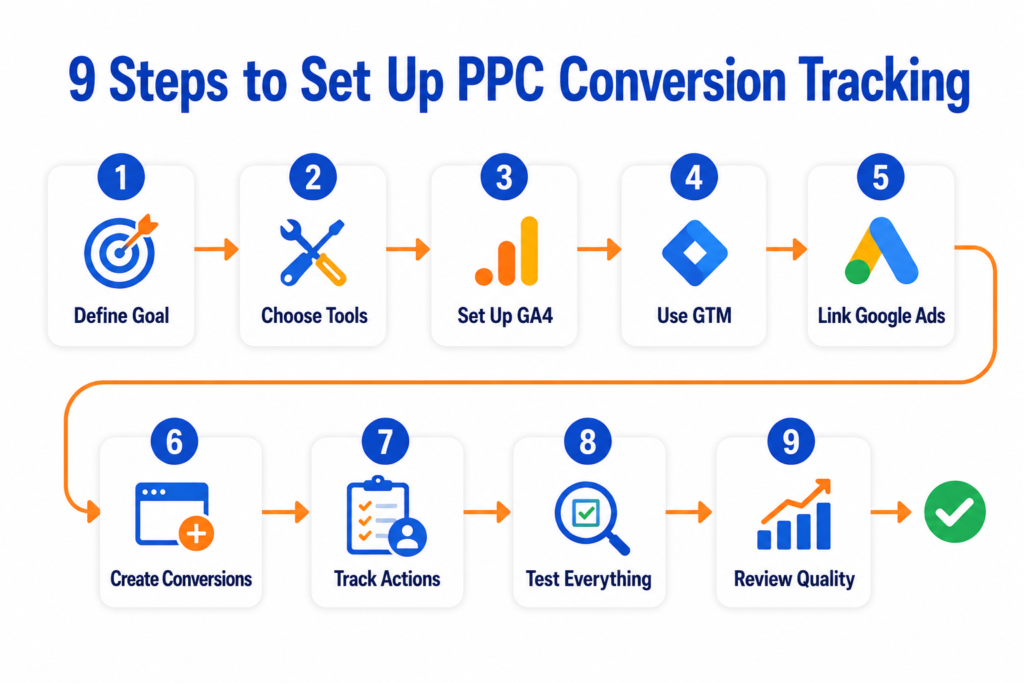
Here is a practical, step-by-step process. It describes the logic rather than exact button locations, because ad platforms update their interfaces often. The principles stay the same.
Step 1: Define Your Main Conversion Goal
Before you touch any tool, decide what action you want to track as a conversion. This must be a real business action, not just a page view. For a service business, it is usually a form submission or a phone call. For ecommerce, it is a purchase. Define one primary goal and any secondary goals separately.
Step 2: Choose the Right Tracking Tools
Most businesses running Google Ads need GA4, Google Tag Manager, and Google Ads conversion tracking to work together. If you also run Meta ads, add the Meta Pixel. If phone calls matter, add a call tracking tool. Start with what you need, not with everything at once.
Step 3: Set Up GA4 Events
Install GA4 on your site (usually through GTM). Then configure the events you need to track. GA4 uses an event-based model, so every action (page view, form submission, button click, purchase) is tracked as an event. Some events are collected automatically. Others, like a specific form submission, need to be set up manually through GTM or GA4’s own event configuration.
Step 4: Use Google Tag Manager for Tags and Triggers
GTM acts as your control centre. Create a tag for each conversion you want to track (a Google Ads conversion tag, a GA4 event tag, a Meta Pixel event). Then set a trigger that tells GTM when to fire each tag. Common triggers include a thank you page loading after a form submission, a button click, or a purchase confirmation page loading.
Step 5: Connect Google Ads With GA4
Link your Google Ads account to your GA4 property. This allows you to import GA4 events as conversions in Google Ads, share audience data, and see a fuller picture of campaign performance. The linking is done in both GA4’s admin settings and in Google Ads under linked accounts.
Step 6: Import or Create Conversions in Google Ads
You have two main paths. You can create conversion actions directly in Google Ads using the Google tag, or you can import conversion events from GA4 into Google Ads. Both work. Importing from GA4 is useful when you already have events configured there and want a consistent setup.
Google now guides you through this when you enter your website domain in the conversion setup and scan for available data sources. The system will detect whether a Google tag or a linked GA4 property is available.
Step 7: Set Up Tracking for Forms, Calls, Purchases, and Bookings
For form submissions, the most common method is to fire a conversion tag when the visitor reaches a thank-you or confirmation page after submitting. If there is no thank-you page, you can track the form submission event directly through GTM using a form submission trigger or a button click trigger.
For phone calls, set up call tracking using Google Ads call extensions, a call tracking tool, or both.
For purchases, ecommerce platforms often have built-in GA4 integration. Configure the purchase event and pass the transaction value.
For bookings, treat the confirmation page or confirmation event the same way you would a form submission.
Step 8: Test Every Conversion Before Launch
This step is critical and often skipped. Submit your own form, call the tracking number, or complete a test purchase. Then check three places: GA4 real-time reports (to see if the event fires), GTM preview mode (to confirm the tag fires at the right moment), and your ad platform’s conversion status (to confirm the conversion is recording).
If the conversion does not appear, the most common causes are a tag that is not firing, a wrong trigger, a missing thank you page, or a consent setting blocking the tag. The same causes are usually behind an account that shows as active but reports no recent conversions, which is the version of this problem people notice weeks later instead of before launch.
Step 9: Review Conversion Quality After Data Comes In
Once the campaign is running and data starts arriving, compare your conversion count in the ad platform with your actual form submissions, calls, or sales. If the numbers do not match, investigate. Common reasons include duplicate tracking (counting the same conversion twice), spam form submissions being counted, or a tag firing on the wrong page.
Tracking is not a set-and-forget job. Check it regularly, especially after website changes.
PPC Conversion Tracking for Lead Generation
Lead generation tracking has a specific challenge: a form submission does not mean a qualified lead. You need to track both the submission and the quality of what comes through.
Set up a conversion for form submissions using a thank you page or a form event. Then track what happens to those leads after they arrive. Do they answer the phone? Do they book? Do they become customers? This usually means connecting your ad data to your CRM or lead tracking system, even if it is a simple spreadsheet at first.
If you import every form submission as a primary conversion and optimise your bidding toward it, the ad platform will find you more of whatever is cheapest, which is often low quality. Separating primary conversions (qualified leads) from secondary conversions (all submissions) protects your budget.
Once the data starts arriving, work out your cost per qualified lead rather than your cost per submission, since those two numbers can drift a long way apart.
PPC Conversion Tracking for Ecommerce
Ecommerce tracking needs to capture the purchase event and the transaction value, so you can measure return on ad spend accurately.
Most ecommerce platforms (Shopify, WooCommerce, and similar) have built-in GA4 integration or plugins that send purchase events automatically. Check that the purchase event fires on the order confirmation page, that the value passes correctly, and that it only fires once per order (to avoid counting the same purchase twice if the customer refreshes the page).
That value is what makes the calculation possible, and working out your return on ad spend from real revenue and spend is the first thing worth doing once purchases start recording.
Track add to cart and initiate checkout as secondary conversions. These are useful signals for understanding where people drop off, but they should not be your primary conversion for bidding.
PPC Conversion Tracking for Phone Calls
Phone calls are a critical conversion for many service businesses, and they are often the most overlooked.
Google Ads offers call extensions and call-only ads, which can track calls directly. You can also set a minimum call duration (such as 60 seconds) so short or accidental calls are not counted as conversions.
For calls from your website (someone clicks the phone number on your landing page), you can use a call tracking tool that dynamically swaps the number based on the traffic source, so you know which calls came from which campaign.
The honest challenge with call tracking is that tracking the call is easier than tracking the quality. A 30-second call where the person hangs up is not the same as a 5-minute call that books a job. Review call recordings or at least call durations to assess quality.
PPC Conversion Tracking for Landing Pages
Landing pages are often the simplest tracking setup, because there is usually one clear action: submit a form, click a button, or call a number.
Track the thank you page load as your primary conversion. If the page uses an in-page confirmation (no separate thank you page), track the form submission event or the button click through GTM.
One common mistake with landing pages is tracking the page view as a conversion. A page view means someone arrived. It does not mean they did anything. Track the action, not the arrival.
Common PPC Tracking Mistakes
These mistakes waste budget and produce misleading data. Avoid them.
• Tracking only clicks and judging success by cost per click alone. Why cost per lead matters more than cost per click explains the difference with real UK cost ranges.
• Not defining a real conversion goal before launching ads.
• Counting every page view as a conversion, which inflates numbers and misleads the bidding system.
• Tracking the same conversion twice (duplicate tags), so one form submission counts as two.
• Forgetting to test on mobile, where forms and pages often behave differently.
• Not testing forms before launch, so a broken form wastes every click.
• Not tracking phone calls when calls are a primary way customers reach you.
• Ignoring lead quality and celebrating cheap conversions that never become customers.
• Using the wrong campaign objective, such as optimising for traffic when you need conversions.
• Not connecting Google Ads and GA4, so data is fragmented.
• Changing campaigns before tracking is verified, so you are making decisions on data you cannot trust.
• Ignoring consent and privacy requirements. Cookie consent banners, browser restrictions, and privacy regulations can all affect what tracking records. Review your setup against current requirements.
• Importing low-quality conversions as primary conversion actions in your ad platform, which teaches the system to find you more of the wrong thing.
How to Check If PPC Tracking Is Working
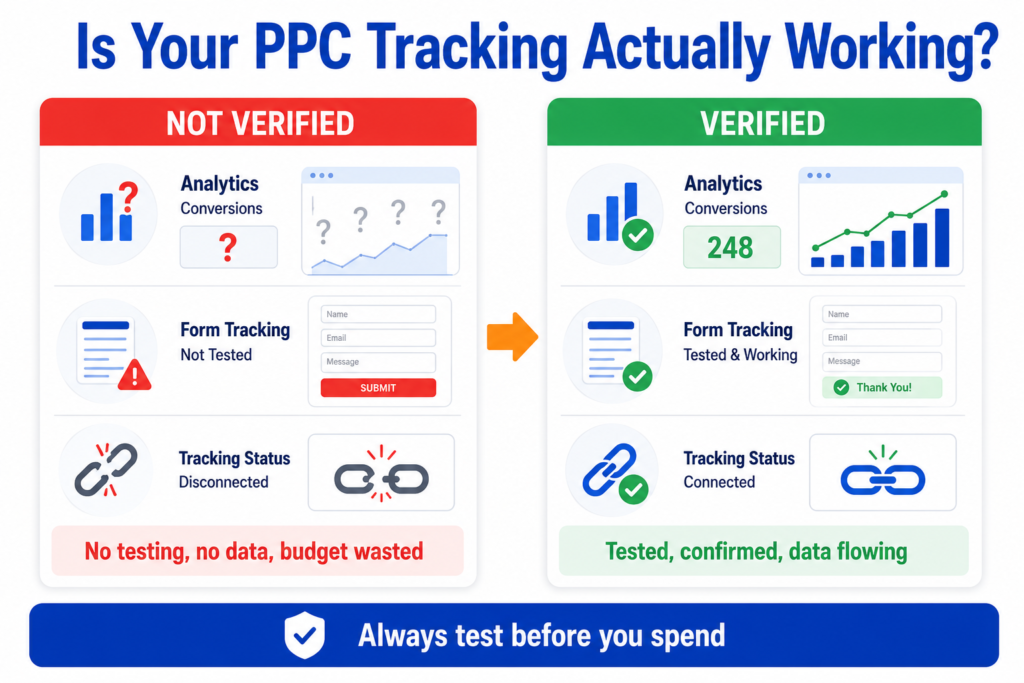
Testing is not optional. Here is how to verify your setup.
Submit your own form and check that the thank you page loads correctly.
Check GA4 real-time reports to see if the event fires at the moment you submit.
Use Google Tag Manager preview mode to confirm the correct tags fire on the correct triggers.
Check the conversion status in Google Ads to see whether it shows as recording or inactive.
Test thank you page tracking by visiting the page directly to confirm the tag fires, then check whether this creates a false conversion (it should not, if targeting is set correctly).
Check for duplicate conversions by submitting once and verifying only one conversion is recorded.
Compare the conversion count in your ad platform with your actual form submissions, CRM records, or order records. If they do not match, investigate.
Check whether spam form submissions are being counted as conversions.
Test phone call tracking by calling the tracking number and checking whether the call is recorded and attributed correctly.
Repeat these checks after any website change, since updates to forms, pages, or site code can break tracking silently.
How to Use Conversion Data to Improve Campaigns
Once tracking is working and data is flowing, use it to make real decisions rather than guessing.
Look at which campaigns, ad groups, and keywords drive the most conversions at an acceptable cost. Put more budget behind those and reduce spending on what is not converting.
Look at conversion quality, not just count. If one campaign delivers ten cheap form fills, but none of them become customers, and another delivers three more expensive ones that all book, the second campaign is better.
Use conversion data to inform your bidding strategy. Automated bidding strategies in Google Ads work better when they have enough reliable conversion data to learn from. If your volume is too low for automated bidding, manual or semi-automated strategies may work better until you have enough data. When to automate your bidding and when to wait goes through that decision in more detail, including which strategy suits which stage.
Review your landing pages based on conversion rates. If lots of people click but few convert, the problem is likely the page, not the ad.
And update your tracking as your business changes. New services, new forms, and new goals all need tracking adjustments.
Two Practical Setup Scenarios
Scenario 1: Local service business
What the business wants to track: Quote request form submissions and phone calls from Google Ads.
Which tools make sense: GA4 installed via Google Tag Manager. Google Ads linked to GA4. A call tracking tool for phone calls.
What conversion events to use: A thank-you page view event fired when the form is submitted. A call event using Google Ads call extensions and a call tracking number on the landing page.
Mistakes to avoid: Not tracking phone calls (many local leads call instead of filling out a form), tracking the landing page view as a conversion instead of the form submission, and not testing the form on mobile.
How to check if tracking is working: Submit a test form, call the tracking number, then verify in GA4 real time, GTM preview mode, and Google Ads conversion status. Compare the conversion count with actual form emails and call logs after the first week.
Scenario 2: Ecommerce store
What the business wants to track: Purchases and add to cart events from Google Ads and Meta ads.
Which tools make sense: GA4 with ecommerce tracking enabled (often through a platform plugin for Shopify or WooCommerce). Google Tag Manager for managing tags. Google Ads conversion tracking for purchase events. Meta Pixel for Meta ad tracking.
What conversion events to use: The purchase event as the primary conversion, with the transaction value passed. Add to cart as a secondary conversion for funnel analysis.
Mistakes to avoid: Not passing the purchase value, so return on ad spend cannot be measured and the break even ROAS the store actually needs stays invisible. Counting the same purchase twice if the customer refreshes the confirmation page. Importing add to cart as a primary conversion, which teaches the bidding system to optimise toward people who browse but do not buy.
How to check if tracking is working: Complete a test purchase, then check GA4 real-time for the purchase event and value. Confirm that the Google Ads conversion status shows active. Check the Meta Events Manager for the purchase event. After a few days of real data, compare the conversion count and revenue in each platform with actual orders.
Practical PPC Conversion Tracking Checklist
Work through this before you launch.
Main conversion goal defined (form, call, purchase, booking).
Secondary conversions separated from the primary.
GA4 installed on the website.
Google Tag Manager installed if needed.
Google Ads linked with GA4.
Conversion actions created in the ad platform.
Form tracking tested (submit a real test).
Call tracking tested (make a real test call).
Purchase tracking tested if ecommerce (complete a test order).
Thank you page tracking tested.
Duplicate tracking checked (one submission equals one conversion).
Mobile tracking tested (forms and pages work correctly on a phone).
Spam leads filtered where possible.
Lead quality reviewed after initial data.
CRM or form records compared with analytics data.
Consent and privacy requirements reviewed.
Reporting dashboard checked for accurate data.
Frequently Asked Questions
Helpful Resources
Set Up Your Web Conversions
Source: Google Ads Help Google’s official, current guide to setting up website conversion tracking in Google Ads. The most reliable place to confirm the latest setup steps.
About Conversion Tracking
Source: Google Ads Help. Google’s overview of what conversion tracking is, how it works, and the different types of conversions you can track.
Google Analytics Help
Source: Google. Official help for GA4, including event setup, ecommerce tracking, and linking with Google Ads.
Google Tag Manager Help
Source: Google. Official help for GTM, covering tags, triggers, variables, and testing.
Meta Business Help Center
Source: Meta. Official guidance for installing and configuring the Meta Pixel, including event setup and testing.
Microsoft Advertising Help
Source: Microsoft. Official help for setting up UET and conversion tracking in Microsoft Advertising (Bing Ads).