
Quick Answer
How do I set up a Meta Ads campaign for ecommerce? Set up the foundations first: a Meta Business account, the Meta Pixel and Conversions API, a connected store, and a product catalog. Confirm your purchase tracking works. Then choose the Sales objective, build a simple campaign, add strong creative, and test before scaling.
What campaign objective should an ecommerce store choose? Usually, the Sales objective aligns the system with the goal that matters, which is purchases. This only works well if your conversion tracking is set up properly first.
What should be set up before launching ads? Your Meta Business account and ad account, the Pixel and Conversions API, a connected store, a product catalog with accurate data, working purchase tracking, and a strong, fast product page.
How much should beginners spend first? Enough to gather meaningful data over a testing period, with the budget focused rather than spread thin. The right figure depends on your product price, margin, and market, so there is no single number that fits every store.
What mistakes should ecommerce brands avoid? Running ads before tracking is ready, choosing Traffic when the real goal is sales, sending clicks to a weak product page, testing too many products at once, judging results too early, and ignoring creative quality.
Introduction
Most ecommerce Meta Ads fail for boring reasons. The tracking was not ready, the product page was weak, the wrong objective was chosen, or the campaign was judged after two days and switched off. The ads themselves are rarely the whole problem.
A Meta Ads campaign for ecommerce is a system, not a boosted post. It connects your tracking, your product catalog, your campaign objective, your creative, and your product page, so that ad spend turns into sales you can actually measure. This guide walks you through that system step by step, with current 2026 guidance, in plain language. No promised return on ad spend, no fake numbers, and no claim that one setup fits every store. Just a practical, honest way to set things up properly.
A quick note on the platform. Meta changes its interface and features often. In 2026, for example, the campaign type many people still call Advantage Plus Shopping has been renamed Advantage Plus Sales. Because of this constant change, this guide focuses on the logic of each step, which stays useful even when buttons move.
What Is a Meta Ads Campaign for Ecommerce?
A Meta Ads campaign for ecommerce is a set of paid ads on Facebook and Instagram designed to sell your products. It is built around getting the right products in front of the right people, then turning those clicks into purchases you can track.
For ecommerce, a campaign is more than an ad. It involves your tracking setup, your product catalog, your chosen objective, your creative, and the product page people land on. All of these work together. A great ad sending people to a poor product page will still fail, and a great page nobody sees will not sell either.
The goal is to create a measurable path from someone discovering your product to buying it, so you can see what works and improve it. That measurability is the whole point, and it is why tracking comes first.
Why Meta Ads Matter for Ecommerce Stores
Meta Ads matter for ecommerce because Facebook and Instagram are where huge numbers of people discover products they did not know they wanted. Unlike search, where people look for something specific, Meta can introduce your product to people based on their behaviour and interests, which is powerful for discovery.
For ecommerce specifically, Meta offers tools built for selling, including product catalogs, dynamic product ads, and retargeting that shows people the exact items they viewed. Used well, these can support both finding new customers and bringing back people who almost bought.
The honest caveat is that Meta Ads do not guarantee sales. They are a channel, and results depend on your product, your price, your creative, your page, and your tracking. Done properly, they can be a strong growth tool. Done carelessly, they waste money. This guide is about doing them properly.
What You Need Before Setting Up Meta Ads
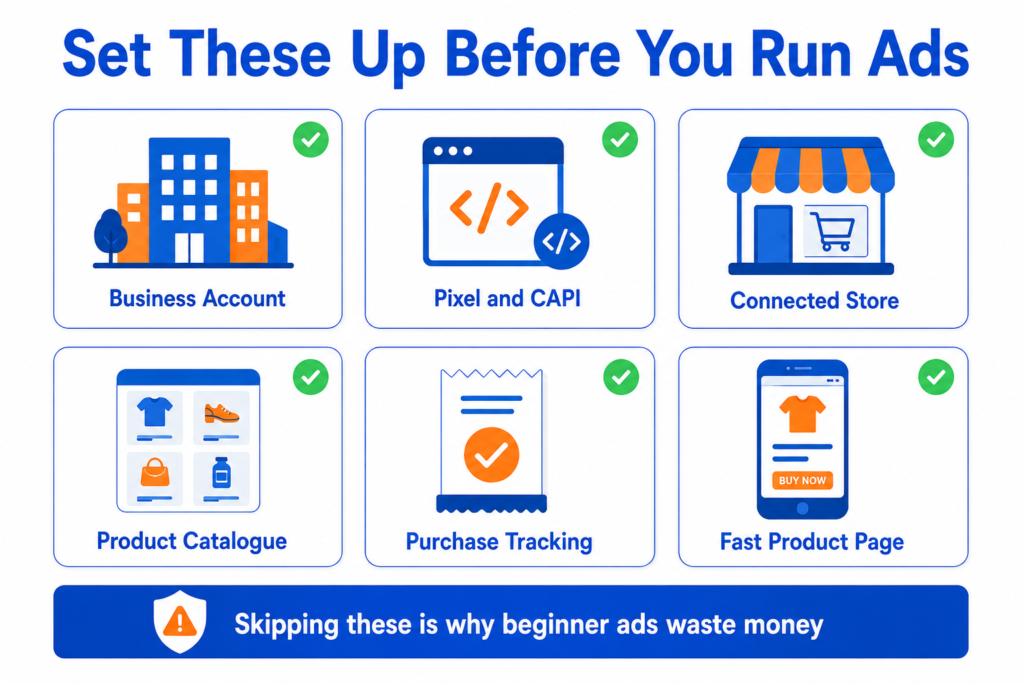
Before you launch anything, get these foundations in place. Skipping them is the most common reason beginner campaigns waste money.
A Meta Business account and an ad account, set up properly so you own and control your assets. The Meta Pixel is installed on your store, and ideally, the Conversions API as well, because in 2026, the Pixel alone misses conversions due to signal loss. Your store is connected to Meta, whether that is Shopify, WooCommerce, or another platform, with a product catalog that has accurate product data. Working, tested purchase tracking, so you can actually measure sales. And a strong, fast product page, because the page matters as much as the ad.
If any of these are missing or untested, fix them before you spend. Sending traffic into a broken or unmeasured setup is money poured into a hole you cannot see.
How to Set Up a Meta Ads Campaign for Ecommerce
Here is the setup process, described as logic rather than exact button locations, because Meta updates its interface often. Keep your first setup simple. Complexity is the enemy of a beginner campaign.
Step 1: Define Your Ecommerce Campaign Goal
Decide what you want the campaign to achieve. For most ecommerce stores, that is sales of a specific product or range. A clear goal determines your objective, your structure, and how you will judge success.
Step 2: Set Up Meta Business Manager
Set up your Meta Business account, which holds your ad account, Pixel, catalog, and pages in one place. Owning these assets yourself, rather than through someone else’s account, protects your business. Take the time to set this up cleanly at the start.
Step 3: Set Up Meta Pixel and Conversions API
Install the Meta Pixel on your store so Meta can track what visitors do. Then set up the Conversions API as well. The Pixel works in the browser, which now misses data due to privacy changes and ad blockers. The Conversions API sends events from your server, which captures conversions the Pixel alone would miss. Using both together gives Meta a fuller, more reliable picture, which matters more in 2026 than ever.
Step 4: Connect Your Ecommerce Store
Connect your store to Meta. Shopify and WooCommerce both have official ways to connect, which can set up the Pixel, the catalog, and event tracking more easily than doing everything by hand. A proper connection is what powers catalog ads and accurate tracking.
Step 5: Set Up Your Product Catalog
Create and connect your product catalog, which is the feed of your products with their images, titles, prices, descriptions, availability, and links. This catalog powers dynamic product ads and is essential for ecommerce. Make sure the data is accurate and complete, because errors here show up directly in your ads.
Step 6: Choose the Right Campaign Objective
For ecommerce, the Sales objective usually makes the most sense because it aligns the system with purchases. It only works well if your conversion tracking is set up and confirmed first, so the system has real purchase data to optimise toward. More on objectives below.
Step 7: Build a Simple Campaign Structure
Keep your structure simple. Avoid creating dozens of tiny ad sets and micro audiences, which split your budget and starve each one of data. A focused structure concentrates spending and learning. More on structure below.
Step 8: Choose Your Audience Targeting
Decide your targeting approach, balancing broad reach with retargeting people who already showed interest. Modern Meta campaigns, especially the Advantage Plus Sales type, lean on the system to find buyers, so heavy manual audience stacking is often less useful than it once was. More on audiences below.
Step 9: Set Your Budget and Schedule
Set a daily or total budget you are comfortable spending to gather data, and a schedule. Keep the budget focused on your main campaign rather than spread across many. If you are unsure where to start, daily budget ranges by campaign goal gives a practical starting point for the US market. More on the budget below.
Step 10: Create Strong Ecommerce Ad Creative
Create several strong creative variations, since creative is one of the biggest levers in ecommerce Meta Ads, especially with automated campaigns that rely on creative signals. Use clear product images, short videos, and honest, clear offers. More on creative below.
Step 11: Set Up Product Ads and Retargeting
Set up dynamic product ads from your catalog, and retargeting for people who viewed products or added to the cart but did not buy. Catalog ads can show people the exact products they looked at, which is a strong ecommerce tactic. More on catalog ads below.
Step 12: Test the Campaign Before Scaling
Do not scale immediately. Let the campaign run through its learning period without constant edits, since frequent changes reset the learning. Test, gather data, confirm your tracking matches your store sales, and only then decide whether to scale, pause, or fix.
Best Meta Ads Campaign Objectives for Ecommerce
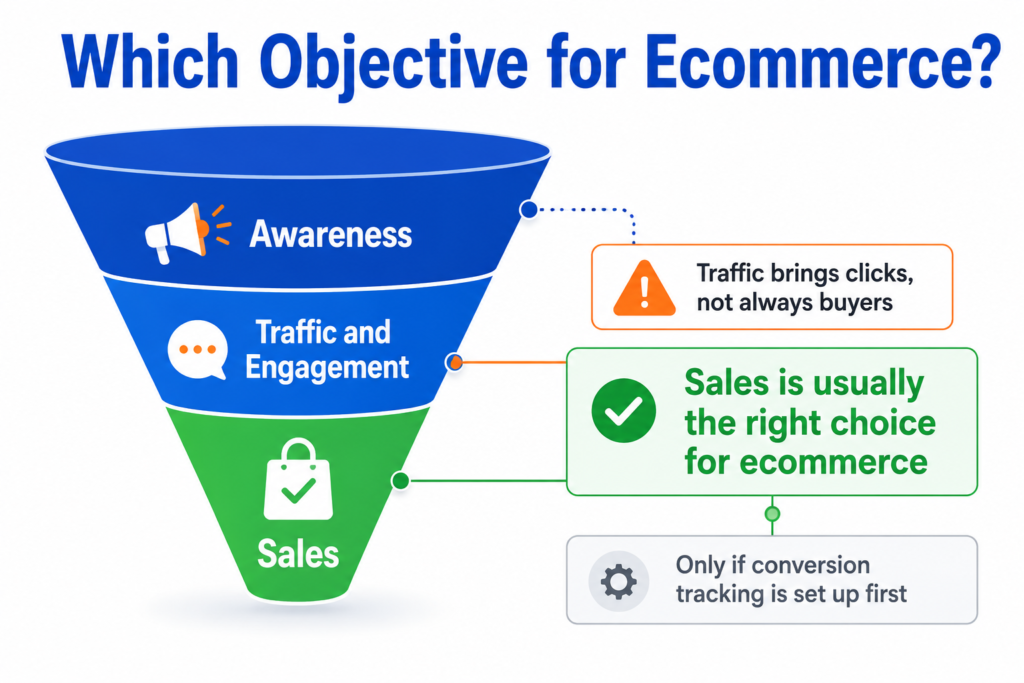
Choosing the right objective is one of the most important early decisions, because it tells Meta what to optimise toward. Here are the main ones and how they fit ecommerce.
Sales. This optimises for purchases and is usually the right choice for an ecommerce store, provided your conversion tracking works. It aligns the system with the outcome you actually care about.
Traffic. This optimises for clicks to your site. It can mislead beginners, because it brings visitors who may have no intention to buy. Lots of cheap traffic can look like success while producing no sales. Use it cautiously, if at all, for ecommerce.
Engagement. This optimises for likes, comments, and interactions. It can build social proof, but engagement is not sales. Do not confuse a popular post with a profitable one.
Leads. This is for collecting contact details, which suits some businesses but is usually not the main objective for a store selling products directly.
Awareness. This optimises for reach and brand visibility. It can have a place for larger brands building awareness, but for a beginner store focused on sales, it is rarely the first choice.
The honest guidance is that Sales is usually the most aligned objective for ecommerce, but only when tracking is set up properly. Without good purchase data, even the right objective cannot be optimised well. No single objective is perfect for every store or every stage.
Meta Ads Campaign Structure for Ecommerce
A simple structure beats a complicated one, especially for beginners. Overly complex setups split the budget and confuse the learning system.
A sensible beginner approach often combines a main campaign that handles finding new customers and selling to them, supported by a focused retargeting effort for people who showed interest but did not buy. Within that, keep ad sets few and budgets concentrated. Many tiny ad sets, each with a sliver of budget, give the system almost nothing to learn from.
Test creative within a clean structure rather than building endless separate campaigns. And avoid changing everything at once. If you adjust the budget, audience, creative, and objective altogether, you will never know what caused a change in results, and you may reset the learning. Pick a simple structure and give it room to work.
Meta Ads Audience Targeting for Ecommerce
Audience targeting on Meta has shifted. The system is now better at finding buyers on its own, so heavy manual targeting matters less than it used to, though it still has a place. Here are the main options.
Broad targeting gives the system freedom to find buyers based on your creative and conversion data. With automated campaigns, this is often the default, and it can work well when your creative and tracking are strong. It is not automatically better for everyone, but it suits the modern system.
Interest targeting narrows the audience by interests. It is not dead, and it can help in some cases, especially for niche products, but stacking many interests is less effective than it once was.
Lookalike audiences find people similar to your existing customers. They can be useful when you have good customer data to base them on.
Retargeting audiences focus on people who have already interacted, such as product viewers, add to cart users, and past customers. These are often your warmest audiences and can be valuable, though retargeting does not always work and depends on having enough traffic to retarget.
Exclusions matter too. Excluding recent purchasers from prospecting, where the campaign type allows it, avoids wasting spend on people who have just bought. Note that some fully automated campaigns limit how much you can exclude, so check what your chosen setup allows.
The honest point is that no single targeting option always wins. The modern approach leans on broad targeting plus strong creative and clean data, with retargeting as support, but your product and market shape what works.
Meta Ads Creative Tips for Ecommerce
Creative is arguably the single biggest lever in ecommerce Meta Ads, especially now that automated campaigns rely heavily on creative signals to find the right people. Strong creative does much of the targeting work for you.
Use a clear product image that shows the item well. Add short product videos, since videos often perform strongly and show the product in use. Try a problem and solution angle, showing what the product solves. Make the product benefit obvious quickly, because people scroll fast. Keep price and offer clarity high, so people are not surprised later. Include trust signals, and use real reviews or proof where you genuinely have them, never invented ones. Design mobile first, since most people will see your ad on a phone. Produce multiple creative variations, so the system has options to test and optimise. And avoid misleading claims or fake urgency, which damage trust and can breach platform rules.
A small skincare brand, for example, might test a short video showing the product in use alongside a clean product image, while making sure the product page backs up every claim the ad makes. The ad and the page must tell the same honest story.
Meta Product Catalog Ads Explained
A product catalog is a structured feed of all your products, including their images, titles, descriptions, prices, availability, and landing page links. It is the backbone of ecommerce advertising on Meta.
Ecommerce stores use catalogs because they power dynamic product ads, which automatically show people relevant products, including the exact items they viewed on your site. This makes catalog ads especially strong for retargeting and useful for product discovery, too.
For catalog ads to work, your product data must be correct. Product images, titles, prices, and availability all need to be accurate because they appear directly in your ads. A wrong price or an out-of-stock item in your catalog leads to a poor experience and wasted spend. The landing pages in your catalog must work too, sending people to the right, working product page. Catalog ads do not always work for every store, but with clean data and enough traffic to retarget, they are a core ecommerce tool. A Shopify fashion store, for instance, might connect its catalog so that someone who viewed a specific dress later sees that exact dress in their feed.
Advantage Plus Sales Campaigns for Ecommerce
Advantage Plus Sales campaigns, which were previously called Advantage Plus Shopping campaigns, are Meta’s AI-driven campaign type for sales. Instead of you manually choosing audiences, placements, and budgets at the ad set level, the system automates most of those decisions. You mainly supply the goal, the budget, the catalog, and the creative.
It is worth noting that this is a different feature from Advantage Plus Creative, which changes the ad itself rather than the campaign structure. How Advantage Plus Creative works explains that side, and the two are often confused.
These campaigns can be effective for ecommerce, because the system is genuinely good at finding buyers when it has good inputs. They tend to suit stores that have solid conversion data, a connected catalog, Pixel and Conversions API tracking in place, and a steady supply of varied creative.
They are not automatically better for everyone, and the platform does not always say so clearly. They tend to work less well for stores with very little data, tiny budgets, or very niche products with a small audience, and they give you less manual control over targeting and placements. A common honest approach is to use an Advantage Plus Sales campaign as the core, while still running a focused standard retargeting effort for high-intent groups like cart abandoners, and a small creative testing effort to find new winners. Whatever you choose, feed the system clean data and strong creative, and give it time to learn before judging it.
Meta Ads Budget for Ecommerce Beginners
There is no universal right budget, and anyone who gives you one without knowing your product and margins is guessing. What matters is spending enough to gather meaningful data while keeping the budget focused.
Think about your budget in terms of learning first. The system needs enough conversions to optimise, so a budget too small to produce conversions will struggle to perform. Meta has suggested setting a daily budget large enough to generate enough conversions to learn, sometimes framed in relation to your target cost per result. Use that as a principle, not a fixed rule. Before you set the number, it helps to estimate what a given budget is likely to produce in reach, clicks, and conversion events, so you can see whether it is enough to learn from at all.
That threshold is worth understanding before you commit, and what a 10 dollar daily budget can and cannot test covers where the floor usually sits.
Decide between a daily budget, which is simpler to control, and a total budget over a set period. Whichever you choose, keep it focused. Spreading a small budget across many products and ad sets is one of the most common beginner mistakes, because it starves each one of data. Start with one or a few of your best products, concentrate the budget, and learn. And do not scale until your tracking and creative are clearly working, because scaling a broken setup loses money faster. If you are thinking in total spend for a test period, you can convert that into a daily figure to see what the system will actually have to work with each day.
Any specific figures you see online are examples only. Your real budget depends on your product price, margin, conversion rate, market, and competition, so treat ranges as starting points to test, not promises.
Meta Ads Tracking for Ecommerce
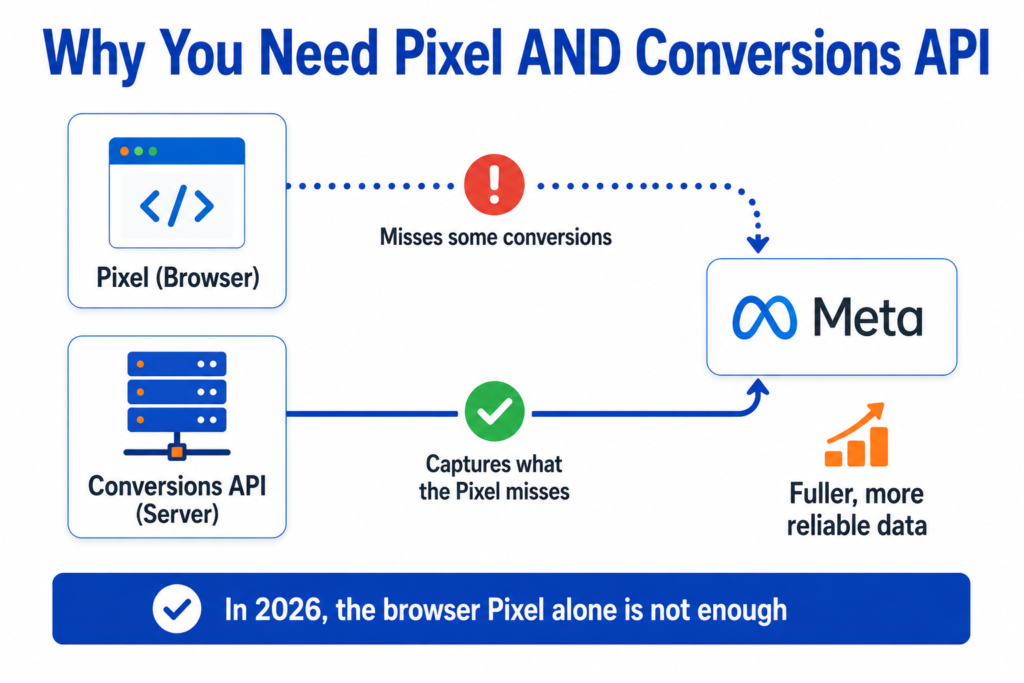
Tracking is the foundation on which everything else rests. Without it, you are flying blind, and the system cannot optimise. Here is what matters.
Meta Pixel. The Pixel tracks actions on your website in the browser. It is essential, but in 2026, it misses conversions on its own because of privacy changes and ad blockers.
Conversions API. This sends events from your server directly to Meta, capturing conversions the browser Pixel misses. Using the Pixel and Conversions API together gives a fuller, more reliable picture, which is why both are now standard practice.
Events Manager. This is where you set up, see, and test your events. Use it to confirm your events are firing correctly. The same discipline applies across platforms, and how to set up and verify conversion tracking covers the checks worth running before any spend goes out.
The key events. View Content shows someone looked at a product. Add to Cart shows interest. Initiate Checkout shows strong intent. Purchase is the conversion that matters most. Catalog events tie these to specific products.
Compared to your store backend. Meta’s reported results will not always match your store’s own sales data because of how attribution works. This is normal, but it means you should compare Meta’s numbers with your actual store sales rather than trusting either alone. Common mismatches come from attribution windows, missed events, or double-counting. Set up tracking carefully, test it, and sanity check it against real orders.
Common Meta Ads Ecommerce Mistakes
These mistakes drain the budget and produce misleading results. Avoid them.
• Running ads before tracking is ready, so you cannot measure or optimise.
• Choosing Traffic when the real goal is sales, which brings clicks but not buyers.
• Sending users to a weak product page that fails to convert.
• Using unclear product images that do not show the item well.
• Hiding price, shipping, or return details until late, which kills trust.
• Testing too many products at once, which splits the budget and data.
• Changing the campaign too quickly, which resets learning.
• Judging performance too early, before the campaign has learned.
• Ignoring creative quality, the biggest lever you have.
• Ignoring mobile page speed, where most of your traffic is.
• Not checking catalog data, so wrong prices or stock appear in ads.
• Not checking purchase tracking, so your numbers are wrong.
• Using fake urgency or misleading claims, which breaches trust and rules.
• Scaling before the data is reliable, which multiplies the problem.
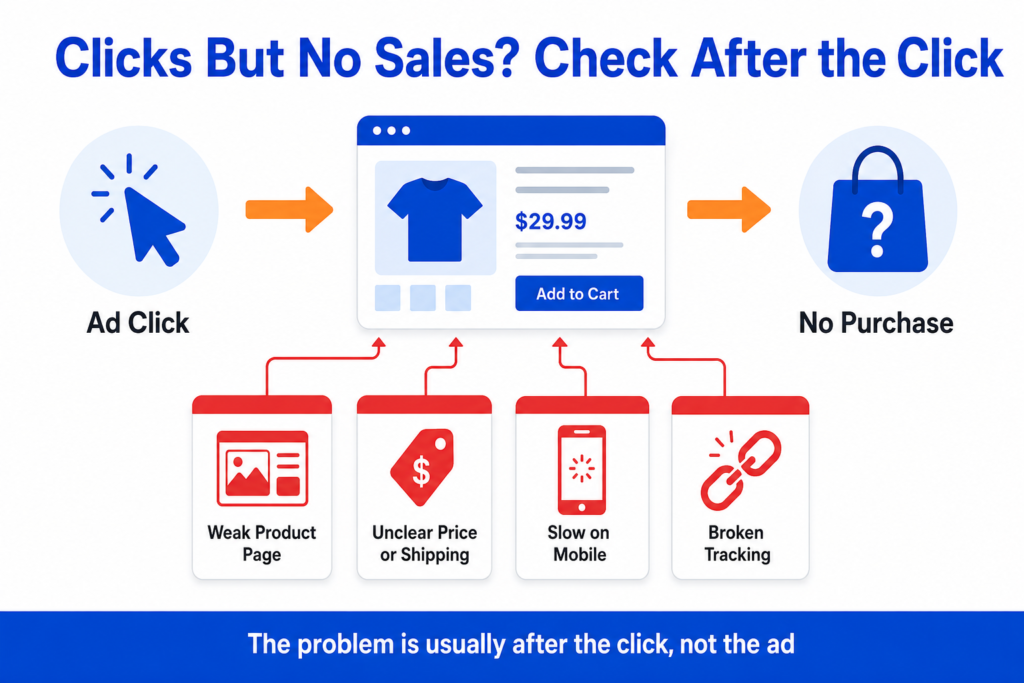
How to Know If Your Meta Ads Campaign Is Working
Judge your campaign on the right signals, and give it a fair chance to learn. Look at these.
Purchases, the outcome that matters most.
Add to cart rate, showing whether people are interested enough to start buying.
Checkout starts, showing strong intent.
Cost per Purchase, compared with what your margins can sustain.
Return on ad spend, useful but not the whole story. Calculate it across the full test period rather than day by day.
Conversion value, including whether higher value orders are coming through.
Landing page views, to confirm clicks are reaching the page.
Click quality, since cheap clicks that never convert are not a win.
Product page behaviour, to spot where people drop off.
Comments and reactions, which can flag trust or expectation issues.
Frequency, to see whether you are showing ads too often to the same people.
Return rate, if available, since returns eat into real profit.
Customer quality, including whether buyers come back.
Store backend comparison, the ultimate check that Meta’s numbers reflect real sales.
Remember that return on ad spend alone is not the full picture. Profit margin, product cost, shipping cost, return rate, and customer value all affect whether a campaign is genuinely profitable. Do not judge performance from one metric only. Working out the break even ROAS for your true margin turns that into a single number you can measure against, rather than a set of factors you hold in your head.
Two Practical Setup Scenarios
Scenario 1: Shopify ecommerce store
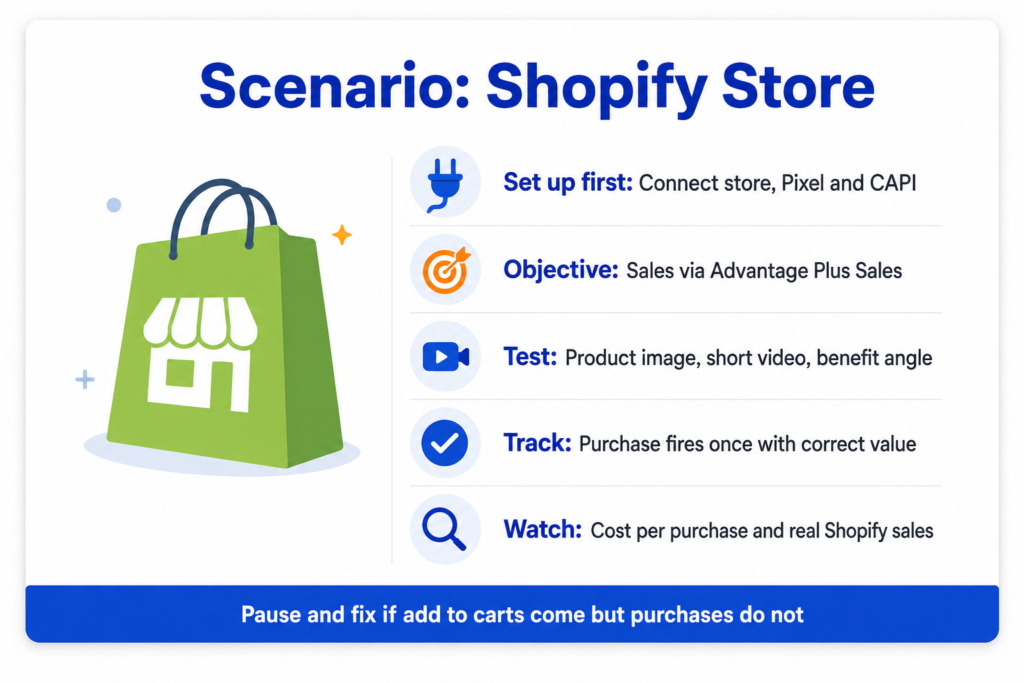
What the business wants: Profitable sales of its products through Facebook and Instagram.
What should be set up first: The Shopify connection to Meta, the Pixel and Conversions API, the product catalog, and confirmed purchase tracking. Shopify’s official Meta connection can handle much of this.
Which campaign objective could make sense: The Sales objective, often through an Advantage Plus Sales campaign, once tracking and catalog are solid, given Shopify’s smooth catalog integration.
What creative should be tested: Several variations, such as a clear product image, a short product video showing the item in use, and a benefit-led angle, all matching the product page.
What tracking must be checked: That the Purchase event fires once per order with the correct value, and that View Content and Add to Cart fire correctly. Compare against Shopify’s own order data.
What can go wrong: A catalog with wrong prices or stock, a slow mobile product page, or testing too many products at once.
What signals to watch: Cost per Purchase, return on ad spend against margin, add to cart and checkout rates, and Shopify’s actual sales versus Meta’s reported numbers.
When to scale: When sales come in at a rate that leaves a healthy margin, and the data is stable, scale gradually rather than all at once.
When to pause and fix: When clicks and add to carts come, but purchases do not, which usually points to the product page, price, shipping, or trust rather than the ad.
Scenario 2: WooCommerce ecommerce store
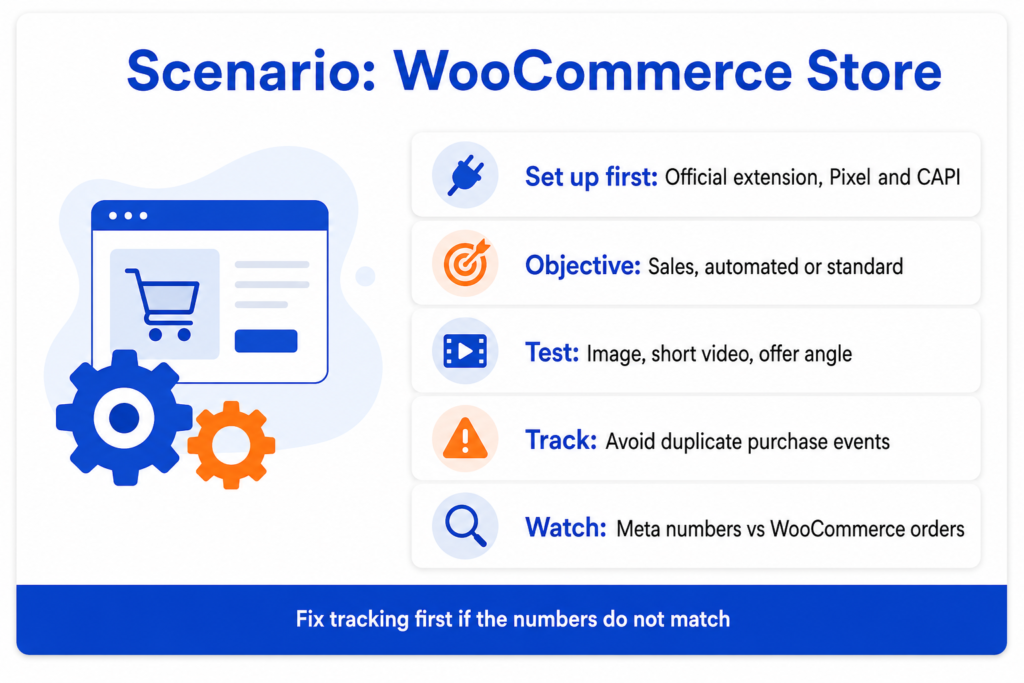
What the business wants: Reliable online sales with accurate tracking it can trust.
What should be set up first: The WooCommerce connection to Meta using the official extension, the Pixel and Conversions API, the product catalog, and tested purchase tracking.
Which campaign objective could make sense: The Sales objective. Whether to use a fully automated Advantage Plus Sales campaign or a simpler standard sales campaign depends on how much data and creative assets the store has.
What creative should be tested: A clear product image, a short video, and an offer-led variation, each honest and consistent with the product page.
What tracking must be checked: That the Purchase event fires once per order with the correct value through both the Pixel and the Conversions API, since WooCommerce setups can sometimes double-count or miss events. Verify against WooCommerce order records.
What can go wrong: Duplicate purchase events inflating results, a missing Conversions API setup, or a product page that loads slowly on mobile.
What signals to watch: Cost per Purchase, return on ad spend, tracking accuracy against WooCommerce orders, and whether returns are eating into profit.
When to scale: When tracking is confirmed accurate, and the campaign delivers profitable sales steadily.
When to pause and fix: When Meta’s numbers do not match your WooCommerce sales, fix the tracking before making any spending decisions, because you cannot trust results you cannot measure.
Practical Meta Ads Ecommerce Checklist
Work through this before and after launch.
Campaign goal defined.
Store connected to Meta.
Pixel installed.
Conversions API set up.
Purchase event checked and firing once per order.
Product catalog connected and checked.
Product titles reviewed for accuracy.
Product images reviewed and clear.
Product page tested on desktop.
Product page tested on mobile.
Budget chosen and focused.
Audience approach chosen.
Several creative variations ready.
Offer clear.
Shipping details visible on the page.
Return policy visible on the page.
Tracking tested end-to-end.
Store backend checked against Meta’s numbers.
Results reviewed over a fair period before scaling.
Frequently Asked Questions
Helpful Resources
Meta Business Help Center
Source: Meta. The official hub for setting up Business Manager, ad accounts, and campaigns. The most reliable place to confirm current setup steps as the platform changes.
About the Meta Pixel
Source: Meta Business Help. Official guidance on what the Meta Pixel is and how to install it. Essential for tracking ecommerce actions.
About the Conversions API
Source: Meta Business Help. Official documentation on the Conversions API, which sends events server-side to capture conversions the browser Pixel misses.
About Advantage Plus Sales Campaigns
Source: Meta Business Help. Official guidance on Meta’s AI-driven sales campaigns, previously called Advantage Plus Shopping, including how they automate targeting and delivery.
About Catalogs in Commerce Manager
Source: Meta Business Help. Official help on creating and managing a product catalog, which powers dynamic product ads for ecommerce.
Shopify Facebook and Instagram Channel
Source: Shopify Help Center. Official Shopify guidance on connecting your store to Meta, setting up the Pixel, and syncing your catalog.
Facebook for WooCommerce
Source: WooCommerce. Official documentation for connecting a WooCommerce store to Meta, including the Pixel and catalog.
Conclusion
Setting up a Meta Ads campaign for ecommerce is less about clever tricks and more about getting the system right. Tracking with the Pixel and Conversions API, a clean product catalog, the Sales objective, strong creative, and a fast, trustworthy product page all work together. Get those right, and your ads have a real chance. Get them wrong, and no budget will save the campaign.
Start with the foundations, keep your first setup simple, choose the Sales objective once tracking is solid, and test before you scale. Judge results by real purchases and your actual store sales, not by one platform metric, and remember that profit depends on margin, shipping, and returns, not just return on ad spend.
Meta will keep changing its tools, as the recent move from Advantage Plus Shopping to Advantage Plus Sales shows, so focus on the logic rather than the buttons. Set things up properly, feed the system good data and honest creative, give it time to learn, and let real results guide what you do next. Start small, measure everything, and scale only what genuinely works.