
Quick Answer
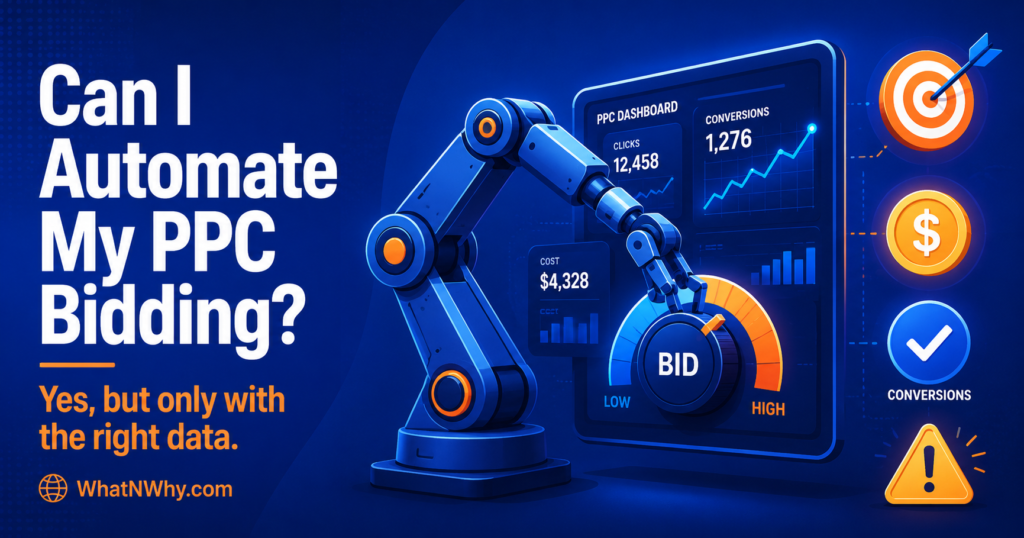
Can I automate my PPC campaign bidding process? Yes. Most major ad platforms, including Google Ads, offer automated bidding that sets your bids for you using machine learning. But automation is only as good as the data you give it. It needs clean conversion tracking and a clear goal to work well.
When is automated bidding a good idea? When you have working conversion tracking, a reasonable amount of conversion data, and a clear goal. It tends to help when there is enough data for the system to learn from.
When is automated bidding risky? When your tracking is broken, your conversion data is poor, your lead quality is low, or your budget is very small. In those cases, automation can confidently spend your money in the wrong direction.
What should beginners check before turning it on? Confirm conversion tracking is working and tested, confirm you are tracking the right action (not just clicks or weak signals), and confirm your lead or sale quality is acceptable.
Does automated bidding remove the need for manual review? No. Automation handles the bidding, but it does not handle strategy, lead quality, search terms, or your landing pages. It still needs a human watching over it.
Introduction
Automated bidding sounds like a dream. Let the machine set your bids, sit back, and watch the results. The reality is more honest than that. Automation can genuinely help, but only when you set it up properly and feed it good data. Turn it on with broken tracking or weak conversions, and it will spend your budget efficiently in the wrong direction.
This guide gives you a practical, beginner-friendly answer to whether you should automate your PPC bidding, when it helps, when it hurts, what you need before you start, and how to do it safely. No promises of lower costs or more conversions, because no honest guide can make those. What you will get is a clear way to decide and a safe way to start.
What Is PPC Bidding Automation?
PPC bidding automation is when the ad platform sets your bids for you, instead of you setting them by hand. In Google Ads, this family of automated strategies is called Smart Bidding. It uses machine learning to decide how much to bid in each auction, based on your goal and the data available.
Instead of you deciding to bid a fixed amount for a keyword, the system adjusts the bid for every single auction, in real time, based on how likely that particular search is to convert. This is sometimes called auction time bidding.
The important thing to understand is that automation does not invent results. It works from the goal you set and the data you provide. If your goal is clear and your data is clean, it has a real chance to help. If not, it is a gamble with your money.
Can You Automate Your PPC Campaign Bidding Process?
Yes, you can, and on most platforms, it is now the default path. Google Ads, Meta, and Microsoft Advertising all offer automated bidding. Meta goes further and automates the creative as well, and how Advantage Plus Creative works covers that side if you run both channels.
But the more useful question is not whether you can automate, it is whether you should, right now, with your current setup. The answer depends on three things: whether your conversion tracking works, whether you have enough conversion data for the system to learn from, and whether the conversions you are tracking are actually valuable.
If all three are in place, automation is usually worth trying. If any of them is missing, you are better off fixing that first, even if it means running manual bidding a little longer. Automation is a tool, not a rescue.
How Automated PPC Bidding Works
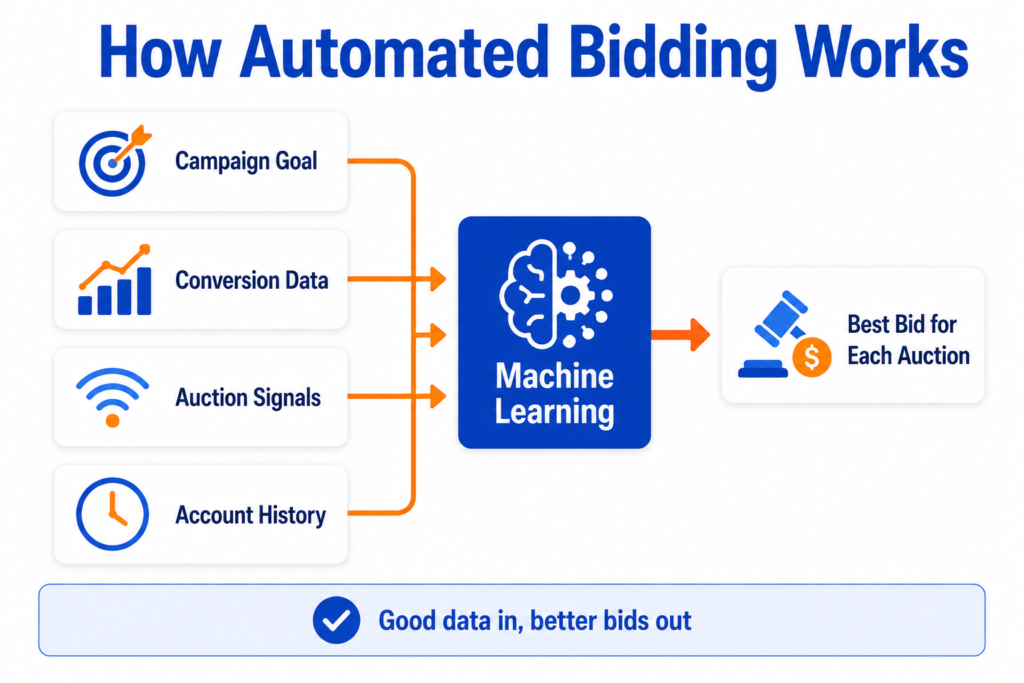
Automated bidding works by combining several inputs to predict the best bid for each auction.
It uses your campaign goal, such as getting more conversions or hitting a target cost per conversion. It uses your conversion data, which tells the system what a good outcome looks like. It uses auction time signals, such as the device, location, time, and other context of each search. And it uses your account history, which helps it learn patterns over time.
From all of this, the system predicts how likely a given search is to convert, and bids accordingly. A search it thinks is likely to convert gets a higher bid. One it thinks is unlikely gets a lower bid or none at all.
This is powerful, but notice the dependency. Every prediction relies on your conversion data being accurate. If you are feeding the system bad data, for example, counting low-quality form fills as valuable conversions, it will learn to chase more of exactly the wrong thing. That is the single most important idea in this whole article.
Manual Bidding vs Automated Bidding
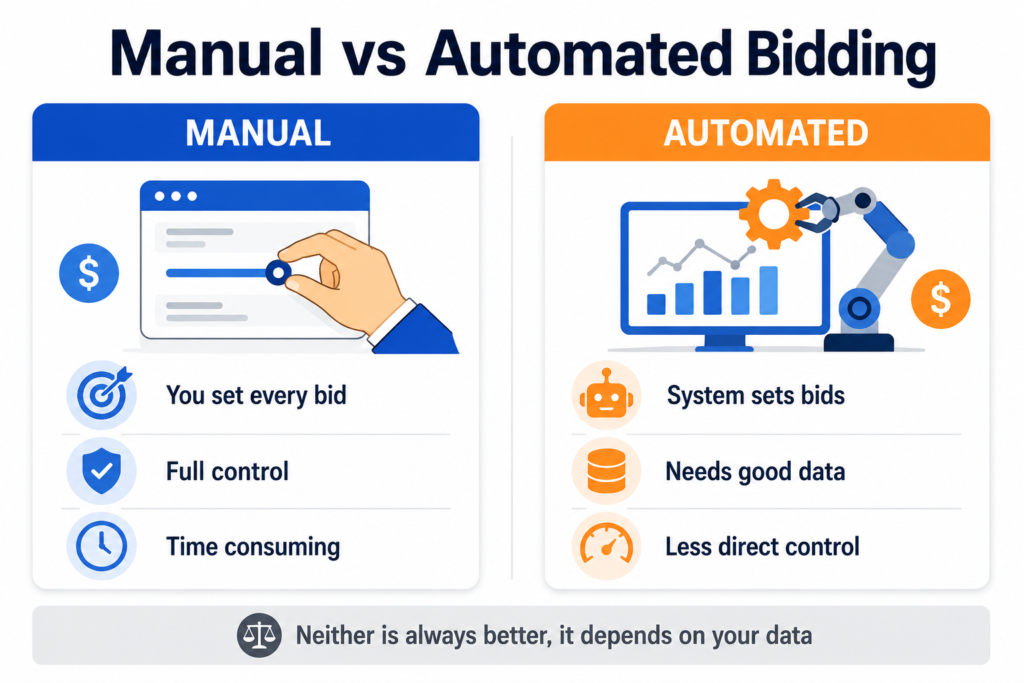
Neither is always better. They suit different situations. Here is an honest comparison.
| Factor | Manual Bidding | Automated Bidding |
| Control | You set every bid directly | The system sets bids for you |
| Data needs | Works with little data | Needs enough conversion data to learn |
| Best use | Testing, very small or new accounts, strict control | Accounts with clean tracking and steady conversions |
| Risk | Slow, time consuming, human error | Can spend confidently in the wrong direction if data is poor |
| Beginner friendliness | Simple to understand, more hands on | Easier to run, harder to diagnose when it goes wrong |
| Budget control | Direct and predictable | Less direct, depends on strategy and settings |
| Learning time | None for the system, but takes your time | The system needs a learning period |
| Human review needed | Constant | Still needed, just different (quality, search terms, strategy) |
The honest takeaway is that automated bidding does not remove work. It changes the work. Instead of adjusting bids, you spend your time making sure the data is clean, the lead quality is good, and the strategy is right.
Common Automated Bidding Strategies
Here are the main Google Ads Smart Bidding strategies, explained. One note for 2026: Google updated how these are labelled in the interface, so Target CPA and Target ROAS now appear as standalone options again, separated from the Maximize strategies. The way they work did not change. No single strategy is best for everyone.
Maximize Clicks
What it means: The system aims to get as many clicks as possible within your budget.
When it can make sense: Early on, when you want traffic to a page to gather data, or when your goal is visits rather than conversions.
When it can be risky: When your real goal is leads or sales. Clicks are not conversions, and this strategy does not optimise for them.
What beginners should watch: Do not mistake clicks for results. Watch what those clicks actually do after they arrive.
Maximize Conversions
What it means: The system aims to get as many conversions as possible within your budget. It will spend your full budget.
When it can make sense: For a newer campaign that has conversion tracking but not yet enough data for a target-based strategy. It is often used as a starting point to build data.
When it can be risky: Because it spends the full budget without a cost constraint, it can chase cheap, low-quality conversions if your data is poor. If there are not enough good conversions to be had, it may spend the rest on weaker traffic.
What beginners should watch: Lead or sale quality, and cost per conversion, since this strategy does not cap cost.
Target CPA
What it means: You set a target cost per conversion (cost per action), and the system tries to get conversions at around that cost.
When it can make sense: When you have a clear cost target tied to your business, and enough conversion data for the system to work with. Google requires conversion tracking before you can use it. Setting that target is easier when you already know what your current cost per lead actually is, since a target pulled out of the air tends to be either unreachable or too generous.
When it can be risky: If you set the target too low, the system may find very few auctions that fit, and your volume can drop sharply. If your conversion data is poor, it optimises toward the wrong thing at a set cost.
What beginners should watch: Whether volume drops too far after setting a target, and whether the conversions it finds are genuinely valuable. Note that from 17 August 2026, Google is changing how budget limited campaigns behave with target based bidding. Campaigns that have been beating their stated target get steered back toward it, so a campaign delivering a £5 cost per acquisition against a £10 target will drift toward £10. This is a bidding behaviour change, not a budget increase. If your campaign shows as limited by budget, review your target before that date. Google’s Bid Target Adjustment Tool, available from 6 July 2026, shows your recent performance and lets you reset the target to match it.
Target ROAS
What it means: You set a target return on ad spend, and the system bids to hit that return, based on the conversion values you report.
When it can make sense: For ecommerce or any business that can assign a real value to conversions, once you have enough data and meaningful, varied conversion values. Your break even ROAS is the floor for this target. Set it below that and the system will optimise efficiently toward losing money, which is exactly the failure this article keeps warning about.
When it can be risky: It needs more data than Target CPA, and it needs accurate conversion values. The 17 August 2026 change described above applies to Target ROAS as well, so a budget limited campaign beating its target will be pulled back toward it. Without good value data, it has nothing reliable to optimise toward.
What beginners should watch: Whether your conversion values are tracked correctly, and whether a high target is starving the campaign of volume.
Maximize Conversion Value
What it means: The system aims to get the most total conversion value within your budget, prioritising higher value conversions.
When it can make sense: For ecommerce where conversions have different values, and you want the system to favour the more valuable ones. Often used to build value data before moving to Target ROAS.
When it can be risky: Like Maximize Conversions, it spends the full budget without a return constraint, so without a target ROAS, it can increase spend significantly.
What beginners should watch: Total spend, and whether the value data passing into the system is accurate.
Enhanced CPC
What it means: A lighter form of automation that adjusts your manual bids up or down based on the likelihood of a conversion.
When it can make sense: Historically, as a bridge between manual and full automation.
When it can be risky: Google has reduced its functionality over time, so in 2026, it is a weaker option than full Smart Bidding for most uses. It offers neither full manual control nor full automation.
What beginners should watch: Whether it is still the right tool at all. For many accounts, a full Smart Bidding strategy or manual bidding is a clearer choice.
When Automated Bidding Makes Sense
Automated bidding tends to make sense when conversion tracking is installed and tested, when you have a clear goal, when you have a reasonable amount of conversion data for the system to learn from, and when the conversions you track are genuinely valuable.
It also helps when you are running fewer, larger campaigns rather than many tiny ones, because the data is pooled and the system has more to learn from. Google itself notes that performance generally improves with fewer, larger campaigns that get more conversions.
When Automated Bidding Can Waste Budget
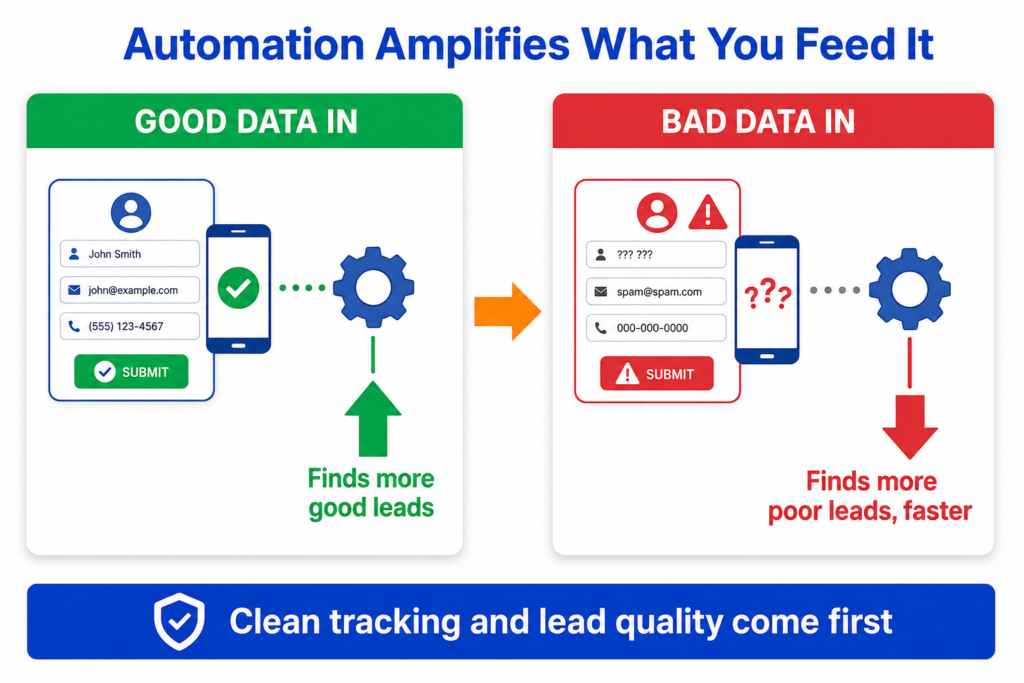
Automated bidding can waste budget when your tracking is broken or untested, so the system optimises toward conversions that are not real. An account that shows as active but records no recent conversions is often the first visible sign that this has happened. It can waste budget when your conversion data is poor, for example, when every form fill is counted as a valuable conversion, even though many are spam or low intent. In that case, the system learns to find more of that low-quality traffic efficiently.
It can also struggle when your budget is very small, because there may not be enough conversions for the system to learn properly. And it can waste money when you change strategy too often, since every change can restart the learning process.
The pattern is consistent. Automation amplifies whatever you feed it. Good inputs, better outcomes. Bad inputs, faster waste.
What You Need Before Using Automated Bidding
Before you switch on automated bidding, make sure these are in place.
Working, tested conversion tracking. This is not optional. Target CPA and Target ROAS require conversion tracking, and all automated strategies depend on it. Test it before you rely on it.
A clear conversion goal. Decide what action matters most, and make sure that is what you are optimising toward, not clicks or weak signals.
Acceptable conversion quality. Confirm that the conversions you are tracking are genuinely valuable. A cheap lead that never becomes a customer is not a good conversion to optimise for.
Enough data. The system needs a reasonable number of conversions to learn from. With very little data, automation has little to work with. If your individual campaigns are too small, pooling them can sometimes help.
A realistic budget. Automation cannot create demand that is not there, and a budget too small for your goal will limit what it can do. Typical PPC costs in the UK gives industry ranges you can sanity check yours against.
How to Automate PPC Bidding Safely
Here is a practical, beginner-friendly process. It describes the logic rather than exact button locations, because ad platforms change their interfaces often.
Step 1: Define the Campaign Goal
Decide exactly what you want the campaign to achieve, such as more qualified leads or more sales at a sustainable cost. The goal determines which bidding strategy fits.
Step 2: Check Conversion Tracking
Confirm your conversion tracking is installed and working. Submit a test form, make a test call, or complete a test purchase, and verify the conversion records correctly. Do not move to automated bidding until this is solid. If tracking is not in place yet, setting up conversion tracking with GA4 and Tag Manager covers the full process.
Step 3: Review Conversion Quality
Look at the conversions you have been getting. Are they real and valuable, or are many of them spam, accidental, or low intent? If quality is poor, fix what you count as a conversion before automating, or the system will chase the wrong thing.
Step 4: Choose the Right Bidding Strategy
Match the strategy to your goal and your data. A newer campaign building data often starts with Maximize Conversions. Once you have enough data and a clear cost goal, Target CPA may fit. For ecommerce with reliable values, Maximize Conversion Value or Target ROAS may fit. There is no single right answer for everyone.
Step 5: Set a Realistic Budget
Make sure your budget is realistic for your goal and your market. Working it out from your CPC and the number of clicks you need gives you a defensible figure, and a PPC budget calculator does that maths in one step. Be aware that strategies like Maximize Conversions will aim to spend your full budget, so set it at a level you are comfortable with.
Step 6: Avoid Too Many Changes at Once
Do not change your bidding strategy, budget, ads, keywords, and landing pages all at the same time, unless there is a clear reason. If you change everything at once, you will never know what caused a change in results, and frequent edits can restart the system’s learning.
Step 7: Monitor Early Signals
After switching, expect a learning period where results can be unstable. Do not panic and change things in the first few days. Watch the early signals, but give the system time to settle before judging it.
Step 8: Review Search Terms and Lead Quality
Automation does not police your search terms or your lead quality for you. Review which searches are triggering your ads, add negative keywords for irrelevant ones, and check whether the leads or sales coming through are actually good.
Step 9: Decide Whether to Scale, Pause, or Fix
Once you have enough data, make a real decision. If the campaign delivers good conversions at an acceptable cost, consider scaling gradually. If results are poor, work out whether the issue is the strategy, the tracking, the lead quality, or the landing page, and fix that rather than just switching strategies.
Automated Bidding for Lead Generation
Lead generation is where automation goes wrong most often, because volume and quality are not the same thing.
If you import every form submission as a valuable conversion and let the system optimise toward it, automation will find you more of whatever is cheapest, which is frequently low quality. A campaign can look like it is producing plenty of cheap leads while producing almost no real customers.
The safer path is to confirm lead quality first. Track what happens after the form, ideally connecting your ad data to your CRM or at least a simple record of which leads become real opportunities. Optimise toward qualified leads where you can, not just raw submissions. A B2B company, for example, is often right to delay automation until it has checked that its leads are genuinely qualified.
Automated Bidding for Ecommerce
Ecommerce is often a better fit for automation because purchases are a clear, valuable conversion with a real value attached.
Before automating, make sure your purchase tracking works and passes the correct value, and that it only counts each purchase once. With reliable purchase and value data, value-based strategies like Maximize Conversion Value or Target ROAS can work well, since the system has something meaningful to optimise toward.
Be patient with data. Target ROAS in particular needs enough conversions with varied values before it can perform. Before setting a target, check the return you are already getting from real spend and revenue, so the number you type in reflects what the account has actually proved it can do. Starting with a volume-based strategy to build data, then moving to a value-based one, is a common and sensible path.
Automated Bidding for Small Businesses
Small businesses need extra care, mainly because of budget and data limits.
With a small budget, you may not generate enough conversions for automation to learn well. That is not a failure; it is just a data reality. In that situation, manual bidding or a simple volume-based strategy may serve you better at first, while you build up data.
Keep your structure simple. Many tiny campaigns, each with a sliver of budget, give the system almost nothing to learn from. Fewer, focused campaigns concentrate the data. And do not change strategy constantly. Give each setup enough time to produce a clear signal before you judge it.
Common PPC Bidding Automation Mistakes
These mistakes waste budget and mislead the system. Avoid them.
• Turning on automation without working conversion tracking.
• Counting weak actions, like a page view or every raw form fill, as valuable conversions.
• Using automated bidding when lead quality is poor, so the system learns to find more poor leads.
• Changing the bidding strategy too often, which restarts learning.
• Running too many small campaigns, so none have enough data.
• Expecting instant results and judging the campaign in the first few days.
• Ignoring search terms and letting irrelevant traffic through.
• Ignoring landing page problems and blaming the bidding.
• Trusting platform recommendations without reviewing them, since they do not always match your goals.
• Optimising for clicks when the real goal is leads or sales.
• Scaling before the campaign has enough data to trust.
• Not checking budget pacing, so spend runs out early or sits unused.
How to Know If Automated Bidding Is Working
Judge automation on the right signals, and give it time. Look at these.
Conversion volume, and whether it is steady rather than wildly swinging.
Conversion quality, not just the count.
Cost per conversion, compared with what your business can sustain.
Search term quality, to see whether the traffic is relevant.
Lead quality, by checking what happens after the lead.
Purchase quality, including returns or refunds for ecommerce.
Budget pacing, to see whether spending is steady and used well.
Impression share, if relevant, to understand how much of the available auction you are capturing.
Landing page behaviour, since poor pages limit results regardless of bidding.
CRM or sales feedback, the ultimate test of whether conversions are real.
Signs of wasted spend, like paying for irrelevant search terms.
Campaign stability over time, since a campaign that settles is easier to trust than one that swings every day.
If these look healthy after a fair period, automation is likely working. If not, diagnose the cause before making changes.
Two Practical Setup Scenarios
Scenario 1: Local service business
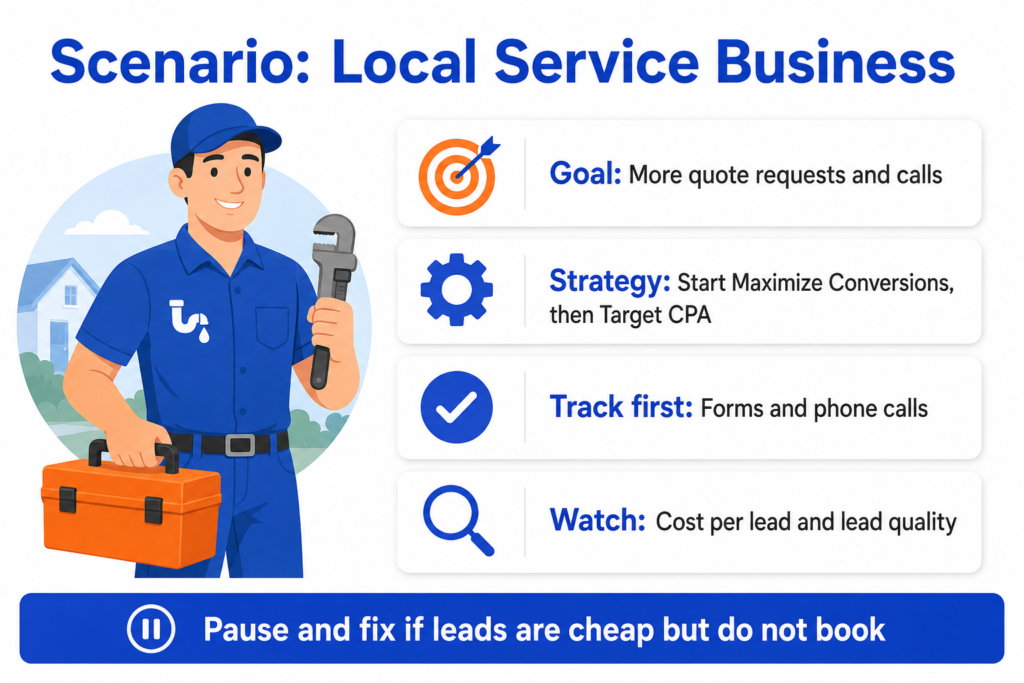
What the business wants: More quote requests and phone calls at a sustainable cost per lead.
Which bidding strategy could make sense: Often, Maximize Conversions to start, while building data, then Target CPA once there is enough conversion data and a clear cost goal.
What must be tracked first: Form submissions and phone calls, both tested and confirmed working. Without call tracking, a major source of leads is invisible.
What can go wrong: If spam form fills or very short calls are counted as conversions, the system optimises toward low-quality leads. If the budget is tiny, there may not be enough data to learn.
What signals to watch: Cost per lead, lead quality after the form or call, and whether enquiries turn into booked jobs.
When to continue: When qualified leads are coming in at a cost the business can sustain.
When to pause and fix: When leads are cheap but do not convert into jobs. Fix what counts as a conversion, the lead form, or the targeting, before changing strategy.
Scenario 2: Ecommerce store
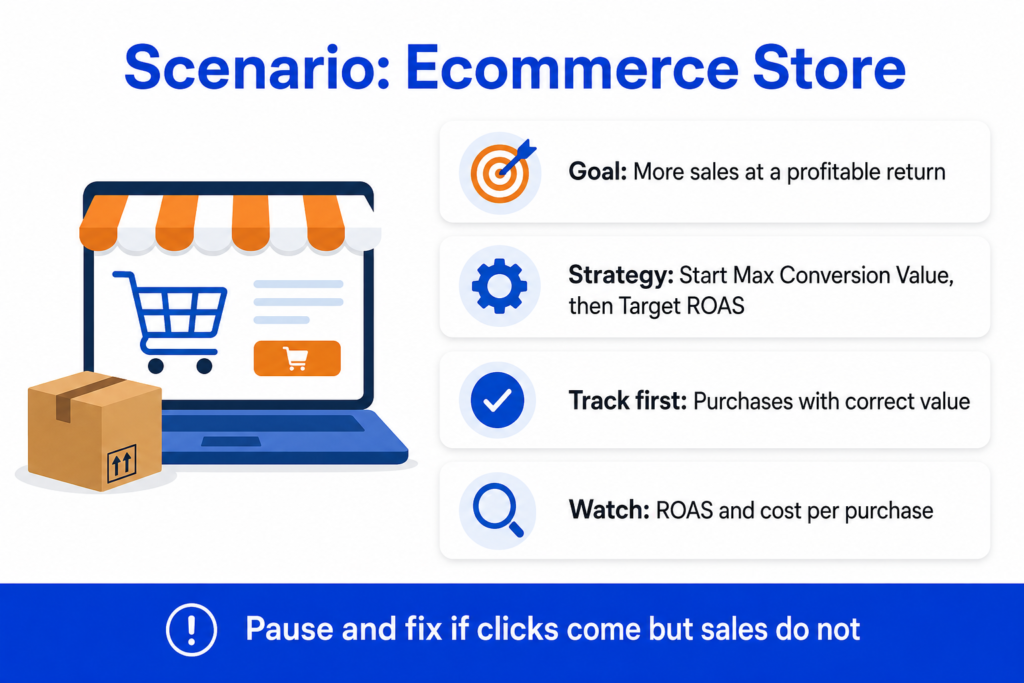
What the business wants: More sales at a profitable return on ad spend.
Which bidding strategy could make sense: Maximize Conversion Value to build data, then Target ROAS once there are enough conversions with reliable values.
What must be tracked first: Purchase tracking that fires once per order and passes the correct value. Without accurate values, value-based bidding has nothing to optimise toward.
What can go wrong: Counting the same purchase twice inflates results. Setting a Target ROAS too high too soon can starve the campaign of volume. Thin data makes Target ROAS unreliable.
What signals to watch: Cost per purchase, return on ad spend, total conversion value, and returns or refunds that reduce real profit.
When to continue: When sales come in at a return that leaves a healthy margin.
When to pause and fix: When clicks come, but sales do not (check the product page), or when the return is below your margin (rethink the target, the products, or the audience).
Practical PPC Bidding Automation Checklist
Work through this before and after you turn automation on.
Clear campaign goal defined.
Correct conversion action chosen as the primary goal.
Conversion tracking tested and confirmed working.
Lead or sale quality checked, not just volume.
A realistic budget for the goal and market.
A bidding strategy that matches the goal.
A simple campaign structure that concentrates data.
Search terms reviewed, with negatives added.
Landing page working properly on desktop and mobile.
No duplicate conversions counted.
No weak actions used as primary conversions.
Enough time allowed for the learning period.
Changes not made too often.
Results checked against CRM or sales data.
Automation reviewed by a human regularly.
Frequently Asked Questions
Helpful Resources
About Smart Bidding
Source: Google Ads Help. Google’s official explanation of Smart Bidding, including how the strategies work and what they optimise for. The most reliable source for current, accurate details.
About Target CPA Bidding
Source: Google Ads Help. Google’s guide to Target CPA, including the requirement for conversion tracking and how to set a target. Useful before choosing this strategy.
About Target ROAS Bidding
Source: Google Ads Help. Google’s guide to Target ROAS, including the data and value requirements. Important reading for ecommerce advertisers.
Google Analytics Help
Source: Google. Official help for GA4, useful for setting up the conversion data that automated bidding depends on.
Google Tag Manager Help
Source: Google. Official help for GTM, useful for deploying and testing the conversion tracking that automation requires.
Microsoft Advertising Help
Source: Microsoft. Official help for automated bidding in Microsoft Advertising, useful if you run Bing ads.