
Quick Answer
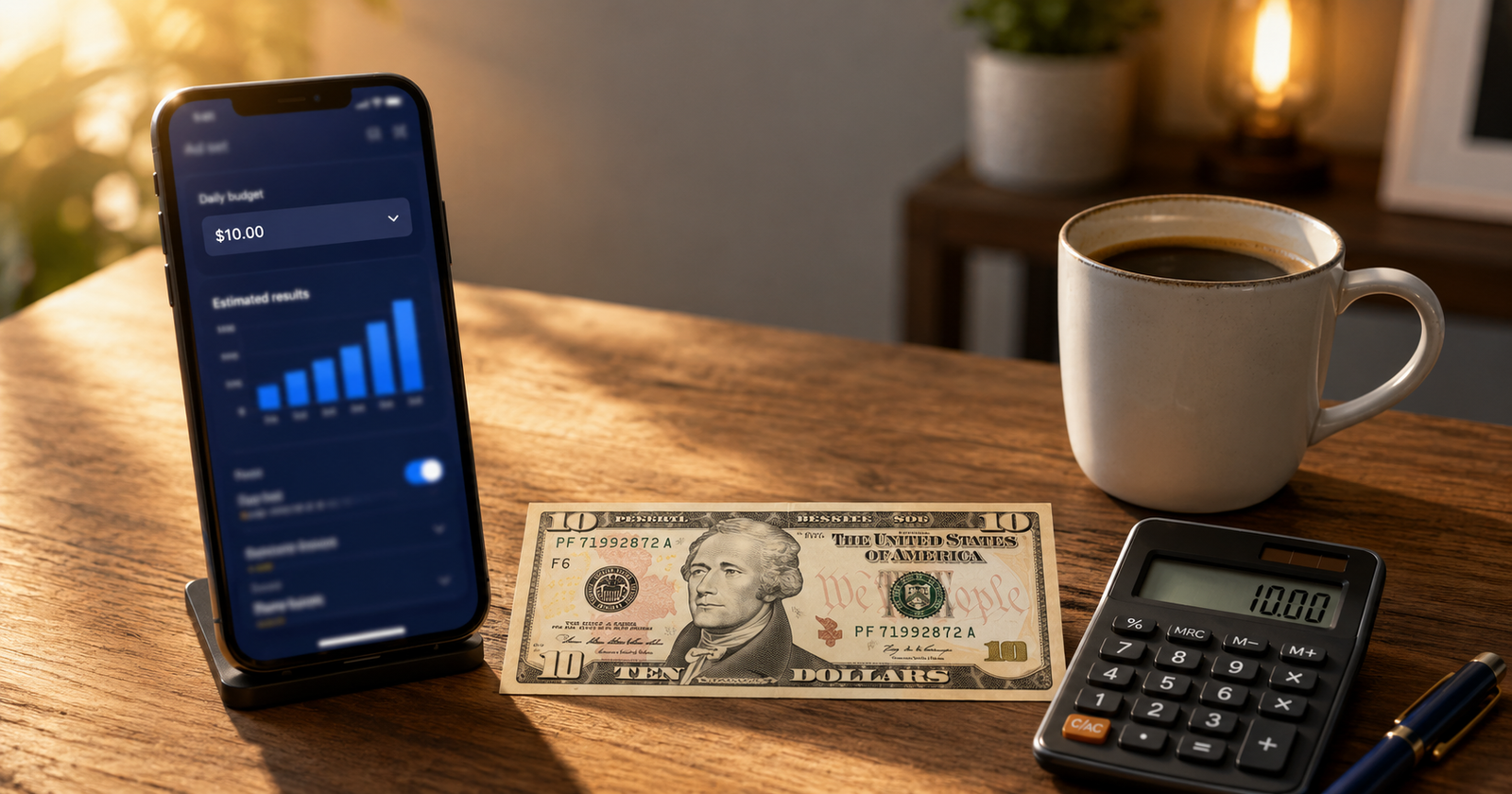
Is 10 dollars a day enough for Facebook ads? It depends on what you are trying to do. For testing creative, learning the platform, running small local awareness campaigns, or retargeting warm audiences, 10 dollars a day can work. For fast scaling, serious ecommerce testing, competitive lead generation, or a broad national reach in the USA, it is usually not enough to get meaningful data quickly.
What can you realistically test with 10 dollars a day? You can test one audience, one or two creatives, and one offer at a time. You will get enough data to learn what works, but slowly. Expect roughly 5 to 15 clicks a day, depending on your industry and campaign objective.
When is 10 dollars a day not enough? When your cost per lead or cost per purchase is high relative to the budget, when you need to test many variables at once, or when you need results fast. If your average cost per lead is around 25 to 30 dollars, 10 dollars a day may not even produce one lead per day, which makes learning very slow.
Should beginners start with 10 dollars a day? Yes, as long as they keep expectations realistic, keep the campaign structure simple, and give it time. It is a reasonable starting point for learning, not a guaranteed path to profit.
Introduction
This is one of the most common questions beginners ask, and the honest answer is not a simple yes or no. Whether 10 dollars a day is enough depends on your goal, your industry, your audience, your offer, and how patient you are willing to be.
This guide breaks it down with real cost context for the USA in 2026, practical examples, and a clear beginner plan. No fake success stories, no invented numbers, and no promises of overnight results.
What 10 Dollars a Day Means in Facebook Ads
Let us put 10 dollars a day into real numbers, so you know exactly what you are working with.
At the current USA benchmark ranges for 2026, a traffic campaign CPC (cost per click) sits around 0.70 dollars on average. At that rate, 10 dollars a day gets you roughly 14 clicks. For a lead generation campaign, the average CPC is closer to 1.92 dollars, which means roughly 5 clicks a day from your budget. In terms of impressions, with a CPM (cost per thousand impressions) in the 11 to 16 dollar range, you are looking at somewhere around 600 to 900 impressions a day.
These are general benchmark ranges published in 2026 reports from sources like WordStream, Triple Whale, and Databox. Your actual numbers will be different depending on your industry, audience, creative, and objective. Finance and insurance pay far more per click than food or apparel. But the point stands: 10 dollars a day buys a modest amount of data. It is enough to learn and test, but it is not a lot.
Over a month, 10 dollars a day adds up to roughly 300 dollars. That is real money, and it is enough to run a focused test if you are disciplined about how you use it. If you want to work the other way round and see what a monthly budget looks like as a daily figure, our Daily Ad Budget Calculator does the maths for you.
What You Can Test With 10 Dollars a Day
With a small daily budget, the key is simplicity. You cannot test everything at once, but you can test one thing at a time and learn from it.
You can test one audience with one or two ad creatives to see which gets better engagement. You can run a small local awareness campaign to see if people in your area notice your business. You can retarget people who have already visited your website or engaged with your page, which tends to be cheaper because the audience is warmer. You can test whether a particular offer or message gets clicks before you spend more.
The common thread is focus. One campaign, one ad set, one or two ads. Do not split a 10 dollar budget across multiple ad sets, because each one will get so little spend that Meta’s system cannot learn anything useful.
What You Should Not Expect From 10 Dollars a Day
Honesty matters here, because unrealistic expectations are the fastest way to waste a small budget.
Do not expect fast sales. If your product costs 50 dollars and your cost per purchase is around 30 to 40 dollars (which is in line with 2026 ecommerce benchmarks), you may only get one purchase every few days at 10 dollars a day. That is slow data. Before you spend anything, it is worth knowing the ROAS you actually need to break even on that product, because a cost per purchase that looks fine can still lose you money once product cost and shipping are counted.
Do not expect a flood of leads. If your cost per lead is around 25 to 30 dollars, which is close to the 2026 average for lead ads reported by WordStream, you may not get even one lead per day. That makes it very hard to judge what is working. You can work out your own cost per lead from your spend and lead count instead of relying on an industry average.
Do not expect to test multiple audiences, multiple creatives, and multiple offers simultaneously. You do not have enough budget to feed them all.
Do not expect the learning phase to finish quickly. Meta’s ad system typically needs around 50 conversion events per ad set per week to exit the learning phase. At 10 dollars a day, reaching that threshold is often not possible for conversion or purchase objectives.
None of this means 10 dollars a day is useless. It means you need to match your expectations to what the budget can actually deliver.
Facebook Ads Cost Factors in the USA
Your costs are not fixed. They depend on several things, and understanding these helps you make better decisions with a small budget.
Industry matters a lot. Apparel and food tend to have some of the lowest CPCs, while finance, insurance, and legal services are among the most expensive. The gap is wide, from around 0.45 dollars per click in apparel to over 3.77 dollars in finance, based on 2026 benchmarks.
Campaign objective changes the cost structure. Traffic campaigns are the cheapest per click. Lead generation and conversion campaigns cost more per click but are optimised to reach people more likely to take action. Awareness campaigns have the lowest CPM but do not drive direct actions.
Audience size and targeting affect competition. Narrow, high value audiences attract more advertisers, which pushes costs up.
Creative quality directly affects your costs. Better-performing ads get rewarded with lower costs in Meta’s auction. A strong video or a clear, relevant image paired with a good headline can genuinely reduce what you pay per click. Meta also has built in tools that generate creative variations automatically, which is worth understanding before you spend time producing everything by hand.
Landing page quality matters because Meta measures what happens after the click. A slow, confusing, or irrelevant landing page leads to fewer conversions, which means a higher cost per result.
Time of year plays a role. Q4 (October through December) is the most expensive period, with CPMs running 15 to 40 percent above the annual average due to holiday competition. Q1 is typically the cheapest.
Location within the USA can also shift costs, since some metro areas have more advertiser competition than others.
These are all general benchmark ranges, and they change by industry, season, audience, and account. Use them to calibrate your expectations, not as exact predictions.
Best Campaign Types for a 10 Dollar Daily Budget
Not every campaign type works well on a small budget. Here is where 10 dollars a day tends to make the most sense.
Local awareness or reach campaigns work well because you are targeting a small geographic area, the CPM is low, and the goal is to be seen by people nearby. A local business can get meaningful local visibility for 10 dollars a day.
Retargeting campaigns are often the best use of a small budget. You are showing ads to people who already know you, so the audience is small and warm, costs tend to be lower, and conversion rates tend to be higher. Even 5 dollars a day on retargeting can work.
Traffic campaigns are the cheapest way to get clicks and learn what resonates, though clicks alone do not mean sales or leads. They can be useful for early testing.
Lead generation or conversion campaigns are possible at 10 dollars a day, but the data comes in slowly. If your cost per lead is high, be prepared to wait longer before you have enough results to judge anything.
Broad national sales campaigns are the hardest to run on 10 dollars a day. The audience is large, competition is high, and the system needs more budget to find the right people.
When 10 Dollars a Day Is Enough
It is enough when you are learning the platform and want to understand how Ads Manager works without risking a large amount. It is enough for local businesses running awareness or reach campaigns in a small geographic area. It is enough for retargeting warm audiences with a specific offer. It is enough for testing one creative or one audience at a time, slowly. It is enough as a starting point before you decide whether to invest more.
When 10 Dollars a Day Is Not Enough
It is not enough when you need fast, statistically meaningful data to make scaling decisions. It is not enough for competitive lead generation where the cost per lead is high. It is not enough for broad ecommerce testing where you need to test multiple products, audiences, and creatives. It is not enough for national campaigns in competitive industries. It is not enough when your offer, creative, or landing page is weak, because a small budget cannot compensate for fundamental problems.
If your goal sits in that second list, the next question is what you should be spending instead. We cover that in what a good daily budget for Facebook ads looks like in the USA.
Two Real World Examples
Example 1: Local service business
What the business wants: A local plumber wants more calls and enquiries from homeowners within a 15-mile radius.
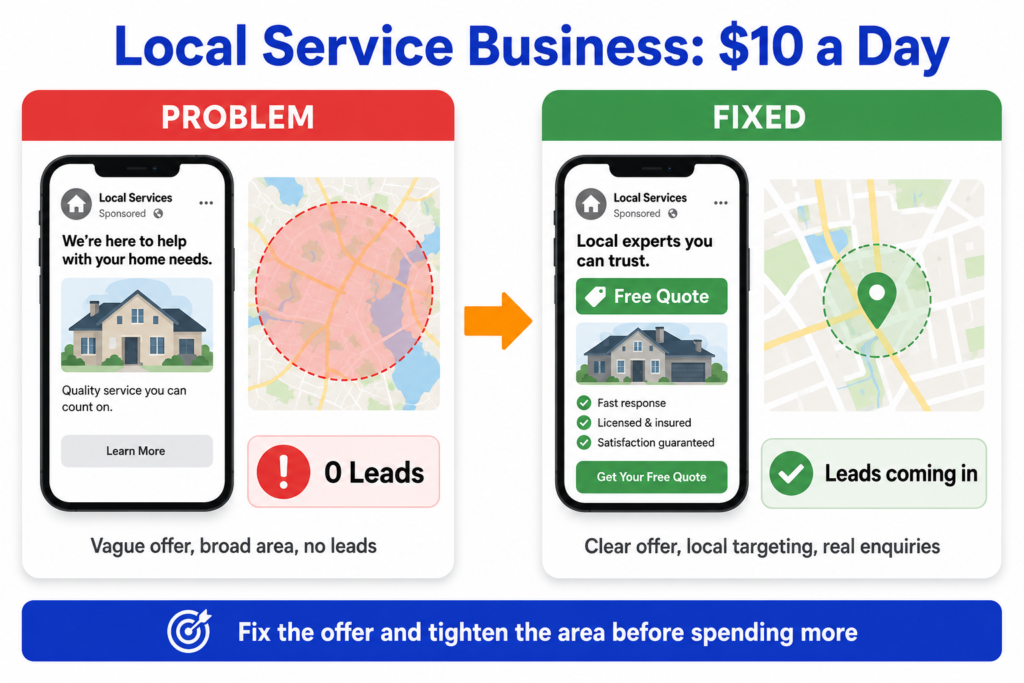
How 10 dollars a day could be used: Run a local reach or awareness campaign targeting homeowners in the area, showing a simple ad with a clear offer like a free quote or a seasonal check. Alternatively, run a lead ad with a short form asking for name, phone number, and type of service needed.
What result signals to watch: Cost per lead, number of actual calls or messages received, and whether the leads turn into booked jobs. Do not judge by clicks alone.
What can go right: The audience is small and local, so 10 dollars a day can generate real visibility and a few leads per week. If the offer is clear and the form is simple, the cost per lead can be lower than national averages.
What can go wrong: If the targeting is too broad, the budget spreads thin and reaches people outside the service area. If the offer is vague or the form asks too many questions, leads drop off. If nobody answers the phone when leads call, the money is wasted.
When to increase the budget: When you see a steady flow of leads turning into jobs, and you want more of the same.
When to stop or fix the campaign: When leads are not converting into calls, when the cost per lead keeps climbing, or when the quality of enquiries is too low. Fix the offer, the form, or the targeting before spending more.
Example 2: Small ecommerce store
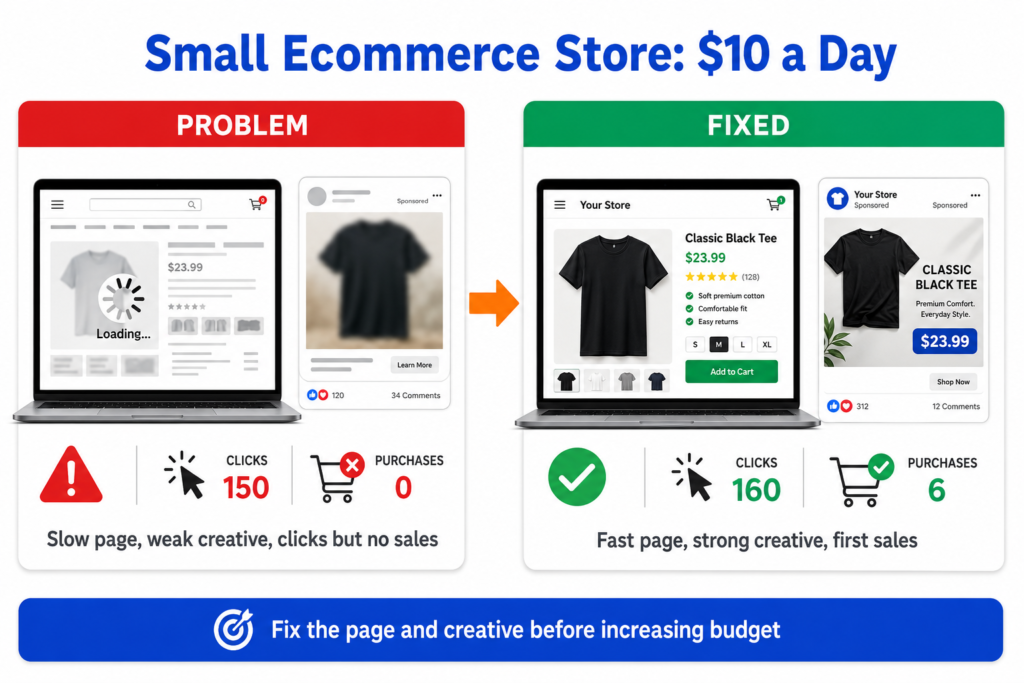
What the business wants: A small online store selling handmade candles wants to get its first sales from Facebook ads.
How 10 dollars a day could be used: Run a traffic or conversion campaign to a single product page, using one strong product image or short video, and a clear offer. Keep the audience fairly focused, such as interest-based targeting around home decor or gifting. The foundations matter more than the budget here, and our guide on setting up a Meta Ads campaign for ecommerce covers the Pixel, catalog, and objective decisions that come first.
What result signals to watch: Cost per click, add to cart rate, cost per purchase, and return on ad spend. Also, watch the landing page conversion rate, because if people click but do not buy, the problem is the page, not the ad.
What can go right: A strong creative with a clear offer can attract clicks cheaply, and if the product page converts well, the store can see its first sales within the first week or two.
What can go wrong: If the product page is slow, confusing, or does not build trust, clicks will not turn into purchases. If the creative is weak, clicks will be expensive. If the store tries to test too many products at once, the budget is spread too thin.
When to increase the budget: When you see purchases coming in at a cost per purchase that leaves a healthy margin, and you want to scale the winning creative and audience.
When to stop or fix the campaign: When clicks are coming, but nobody is buying (fix the product page), when cost per click is high (fix the creative), or when cost per purchase is above your margin (rethink the offer or the audience).
Simple Budget Plan for Beginners
This plan assumes you are starting from scratch with 10 dollars a day. It is a guide, not a guarantee.
First 3 days. Launch one campaign with one ad set and one or two ads. Do not touch anything. Let the system start delivering and collecting data. Resist the urge to change things after a few hours.
First 7 days. Review the early data. Look at cost per click, click through rate, and whether your pixel is recording the actions you care about (page views, add to carts, form submissions). Do not judge final results yet. You are looking for signals, not conclusions.
First 14 days. Now you have roughly two weeks of data. Compare your cost per click and cost per result to the benchmark ranges for your industry. If one creative is clearly outperforming the other, pause the weaker one and let the winner run. If both are poor, the problem is likely the creative, the offer, or the landing page, not just the budget.
Before increasing the budget: Make sure you have at least one creative that is performing at or near a cost per result you can afford. Make sure your tracking is working, and you trust the data. Make sure the landing page is doing its job. Then increase gradually, no more than about 20 percent at a time, to avoid resetting the learning phase. If you are planning what that next step should look like, the Meta Ads Budget Calculator helps you estimate reach, clicks, and leads at a higher spend before you commit to it.
This plan does not promise results. What it does is give the system enough time to learn and give you enough data to make a real decision about whether to invest more.
Common Mistakes Beginners Make
Expecting sales immediately, then killing the campaign after one day.
Running too many ad sets on a small budget, so each one gets a dollar or two a day and learns nothing.
Changing the campaign every few hours resets the learning process.
Using weak creative and expecting the budget to make up for it.
Sending traffic to a slow, confusing, or irrelevant landing page.
Choosing the wrong campaign objective, like optimising for traffic when you actually need leads.
Ignoring pixel or conversion tracking, so you cannot see what is actually working. If this part is not set up yet, start with how to set up conversion tracking properly.
Judging the campaign only by clicks instead of real actions like leads, calls, or purchases.
Ignoring lead quality and celebrating cheap leads that never become customers.
Using broad targeting without a clear offer, so the ad reaches everyone and resonates with no one.
Scaling the budget before you have enough data to know what is working.
Practical Checklist Before Spending 10 Dollars a Day
Work through this before you launch.
You have a clear offer that a stranger would understand in seconds.
You have a clear audience in mind, even if it is broad, it is defined.
You have at least one good creative, ideally a short video or a strong product image with a clear headline.
You have chosen a simple campaign objective that matches your actual goal.
Your landing page is live, fast, and works well on mobile.
Your page loads quickly on a phone.
Your pixel or tracking is set up and recording the events you care about.
Your conversion event is checked and firing correctly.
Your budget is set to 10 dollars a day at the ad set level.
You have one main goal for this test, not five.
You have a plan for tracking lead or sale quality, not just volume.
You are willing to give it at least 7 to 14 days before judging.
Your ad does not contain false claims or misleading promises.
Frequently Asked Questions
Helpful Resources
About Meta Advantage Campaign Budget
Meta Business Help Center
Meta’s official explanation of how campaign budgets and ad set budgets work, including daily and lifetime options. Useful for understanding how your 10 dollars is distributed.
Meta Business Help Center explains how Meta’s auction works, including how ad quality, bid, and estimated action rates determine delivery. Helps you understand why creative quality affects your costs.
Meta: The main hub for official guides on campaign setup, objectives, budgets, and troubleshooting. The most reliable source for how Ads Manager works.
WordStream Facebook Ads Benchmarks
WordStream / LocaliQ is one of the most widely cited annual benchmark reports, covering CPC, CPL, CTR, and CVR by industry for traffic and lead campaigns. The 2025 data (published late 2025) is the basis for many of the 2026 ranges referenced in this article.
Meta Business Help Center: Meta’s explanation of the learning phase, how it works, and why frequent edits or low budgets can keep your campaign stuck in it.
Note: Benchmark numbers cited in this article are drawn from published 2026 reports by WordStream, Triple Whale, Databox, and other analytics platforms. They are industry averages and general ranges, not guarantees. Your actual costs will vary based on your industry, audience, creative, offer, and timing.